Showing posts with label Encryptomatic. Show all posts

23 February 2023

MailDex 2023 Update 2.1.3 Now Available

Encryptomatic LLC has released the latest version of MailDex,  Update 2.1.3.  This update is recommended for all customers. It resolves customer reported issues and includes 25 enhancements and improvements.

MailDex 2.1.3 may be updated using the software's update feature in the Help menu.  It can also be downloaded from the MailDex website.

MailDex is a personal email search engine that privately allows you to perform fast email searches on your Windows PC.  Use MailDex to combine email content across all major email client file formats, including PST, OST, OLM, MSG, EML, EMLX, MHT and MBOX.  Convert emails to PDF and many other formats. Organize and manage millions of emails with MailDex.

MailDex is free to try for 15 days and includes a year of updates and phone/email/live support.

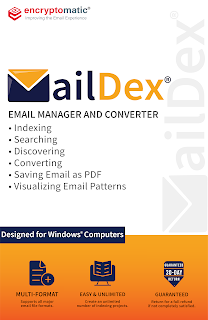
MailDex software box illustration, featuring the MailDex envelope logo in blue and gold. Text on the box reads: Email Manager and Converter. Bullet items include Indexing, Searching, Discovering, Converting, Saving Email as PDF, Visualizing Email Patterns. Blocked text reads Designed for Windows Computers.  Multi email formats supported. Easy and Unlimited Projects, 30 day guarantee.

For more information about MailDex, contact Encryptomatic LLC or visit the product home page.

01 February 2023

MailDex 2023 Update Now Available

Fargo, ND - Encryptomatic LLC today announced the availability of MailDex email viewer/converter, version 2.0.42 maintenance update. This release includes various improvements, features and fixes, and is recommended for all customers. For transparency, a full list of disposed issues is displayed below.

What is MailDex?

MailDex® by Encryptomatic® LLC is an affordable Windows® software tool for indexing, searching, discovering, visualizing and converting emails. MailDex works across many email client formats, including Outlook PST, OST, OLM and MSG files, Thunderbird's EML, MBOX, as well as WINMAIL.DAT, MHT, EMLX files.

Use MailDex to organize, find, archive, and present important email content. With MailDex, you can locate those few important emails hidden among millions. 

MailDex respects your privacy by performing all of its work on your computer. No email content or metadata is ever sent to our servers. All processing is local.

For a 15 day free trial of this latest release, please visit the official MailDex homepage.

An illustration of MailDex software box containing the mail envelope logo and encryptomatic LLC logo. 30 day no risk guarantee.

Release notes - MailDex - 2.0.42.0


Fixes
MDX-586 Replace zip com with .net component that has standard / core versions
MDX-591 Clarifying text change, "Import Emails" to Import Email Wizard
MDX-592 Added missing text to toolbar icons

Improvements
MDX-614 Sort subfolders alphabetically
MDX-598 Export email properties to a file
MDX-582 Improved MailDex installation

Resolutions
MDX-241 Resolved issue with Mail Actions
MDX-615 Resolved issue with Export to XML single (base64 atts)
MDX-616 Resolved issue with import options
MDX-618 Chinese simplified GB18030 emails are now displayed correctly from a PST/OST file
MDX-620 Resolved Error when exporting to PDF Zipped
MDX-621 Resvoled issue with Zip file password protection

05 July 2022

Encryptomatic OpenPGP Add-In for Microsoft Outlook is Updated

 We have updated Encryptomatic OpenPGP add-in for Microsoft Outlook. The new update, version 2.7.16, is now available on the product's official home page, or by running the updater within the software.

This update contains improvements suggested by customers and also several bug fixes.  The full list is included here for transparency.

Encryptomatic OpenPGP software box illustration showing email logo with a lock and Encryptomatic LLC logo. 30 day guarantee.

In a nutshell: we fixed several bugs, added new icons, enhanced resolution scaling so the application looks better in Microsoft Outlook and the Microsoft Windows desktop, made things work better with key servers, enhanced our compatibility with Thunderbird's OpenPGP email encryption, added an auto start option for the desktop OpenPGP app, and added encrypting text in clipboard. The full list of improvements for this release is below:

EPGP-358 Encrypting text from the clipboard sometimes causes an exception
EPGP-357 Opening Thunderbird OpenPGP message causes prompts on program exit
EPGP-356 Key servers don't appear keys import dialog
EPGP-355 Added new key servers to our key list
EPGP-354 Opening and closing and opening the "Key Management -> Key Import -> From Key Server" throws exception
EPGP-353 No default button on Generate new key form
EPGP-352 Exception thrown while manually deleting keys from keys folder
EPGP-350 Clicking cancel on passphrase dialog crashes the app
EPGP-349 Change key expiration date updates date to the date in the past or other wrong date
EPGP-347 The cancel button added to Encrypt clipboard form
EPGP-346 Fixed bug where a key failed to update on Windows app
EPGP-339 [Desktop] Sign and encrypt overwrites existing file
Enhancements
EPGP-194 Keyservers in OpenPGP for Outlook
EPGP-348 Make links in enc / dec report clickable so they go to the folder where the resulting files are stored
EPGP-196 Enhanced desktop icons
EPGP-351 Enhance resolution scaling for icons in Add-ins tool bar
EPGP-362 Added an auto start option for the Windows app.
EPGP-344 Enhance resolution scaling with Windows app

EPGP-361 Key Servers improvements


Encryptomatic OpenPGP brings OpenPGP email encryption to Microsoft Outlook 2013 and later, and OpenPGP file encryption to the Windows 10/11 desktop.  It's free to personal users, journalists, non-profit organizations, activists, and very affordable for business and government users. For more information, visit the Encryptomatic OpenPGP product home page.

10 March 2022

MailDex Email Manager Updated to Version 1.5.50

It has been a lot of work, and today we are happy to announce the availability of MailDex update 1.5.50.  In this update we set out to rewrite our mail indexing engine to improve speed and accuracy. Working with customers we were able to incorporate numerous suggested improvements and enhancements. 

MailDex lets you index many different email types and then search and convert them. We invite you to try MailDex free for 15 days.

For those who may have been tracking a specific issue, the changelog is provided below for transparency.


MailDex software box illustration showing 30 day money back guarantee. MailDex envelope logo and Encryptomatic LLC logo also are present.


Changelog MDX 1.5.50


Issue resolutions:
MDX-522 Search Display indicator issue resolved.
MDX-521 Search is improved
MDX-519 Commandline export error and fails to process, resolved.
MDX-514 Export Speed settings improved
MDX-513 End of Stream error when indexing EML files is fixed
MDX-512 Indexing process not displayed is fixed
MDX-510 Improved indexing of Powerpoint files
MDX-507 OST to EML conversion improvements
MDX-505 Improved indexing of pst/ost files from MS Outlook
MDX-448 Export emails to MBOX file is improved
Story
MDX-527 Some in house created files fail to read (resolved)
MDX-526 The method or operation is not implemented (resolveD)
MDX-503 Options to export visuals added.
MDX-317 Errors shown while indexing and enumeration is resolved
MDX-306 Extremely slow export related to Single PDF Attachments imaged, resolved.
Sub-taskMDX-517 SingleXML export fails for PST fileTask
MDX-528 Data error (cyclic redundancy check)
MDX-520 Delay on folder delete
MDX-515 Support .EMLX format (apple email files)
MDX-506 SingleXML export fails
MDX-502 Indexing is not triggered by the new version on existing files.


What is MailDex?

MailDex® by Encryptomatic® LLC is a Windows® software tool for indexing, searching, discovering and converting emails. MailDex works across many email client formats, including Outlook .pst, .ost, and .msg files, and Thunderbird's .eml, .mbox, as well as winmail.dat, and .mht files.

With MailDex, you can discover those few important emails hidden among millions. Use MailDex to organize, find, archive, and discover important email content

19 April 2021

PstViewer Pro 2021 version 9.0 is Released.

 PstViewer Pro 2021 has been released. This is a major update to our popular email viewer and converter.  With PstViewer Pro 2021 (version 9), major improvements have been made to the speed of exporting email to PDF documents.


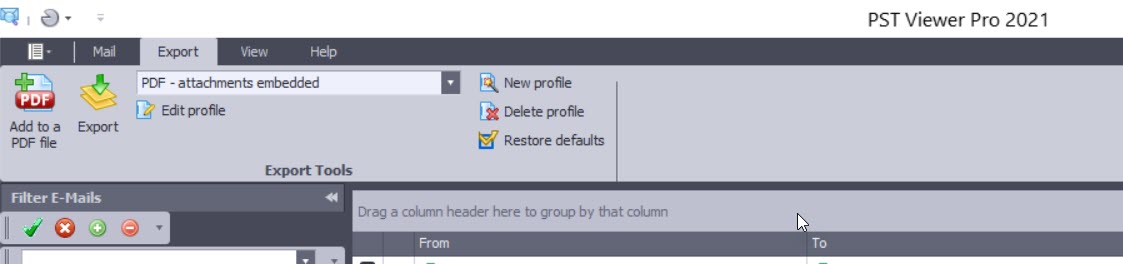
PstViewer Pro 2021 main screen.


PstViewer Pro is an email viewer for opening Outlook .pst/.ost/.msg/winmail.dat email files, as wells .eml and .mbox email files.  PstViewer Pro can be used to search for email messages, and to export email messages either individually or in bulk to pdf, gif, tif, docx, csv, xls and many other formats.


Screen image showing PstViewer Pro export menu.

A free trial of PstViewer Pro can be downloaded from the product home page.

For assistance in installing or uninstalling the software, contact Encryptomatic Support.

Improvements in PstViewer Pro 2021:

Software improvements and resolved issues in this major release are shown below. We have retained some of the issue numbers, in case you were tracking a specific issue.

- Single PDF export Imaged and Embedded restriction implemented with a warning if too many emails are embedded.

- Individual PDF export performance significantly improved

- ISO/A conversion performance has been enhanced

-  A issue in Mail Actions has been resolved. (PVP8-401)

- An issue with html links is resolved. (PVP8-408)

- Favorites tab has been enhanced (PVP8-403)

- Excel files convert in Single PDF exports is improved (PVP8-368/PVP8-378)

- UI issue for selected items is fixed (PVP8-399)

- Single Docx file restriction implemented to prevent performance issues.

- Single PDF conversion with MBOX is resolved. (PVP8-380) Restriction applies to this fix as well.

- Resolved issue where non-convertible attachments were sometimes not embedded on the output PDF (PVP8-396)

- UI Bug for the side pane (minor) PVP8-410

- Long build up time for Single Docx files (PVP8-414)

- Predefine/detect last email exported with the Single PDF restriction and move highlight to that email or auto batch convert the next 1000 emails from the last exported (PVP8-415)

- Adjust the profile naming schema for Folder tree PDF and copy (PVP8-412)

28 September 2020

Encryptomatic Announces the Availability of OpenPGP for Windows Desktop and Outlook.


We appreciate all of the support we have received from users of Encryptomatic OpenPGP add-in for Microsoft Outlook. Today we are very pleased to announce that we have extended its encryption capabilities to include folders and files on the Windows desktop.  

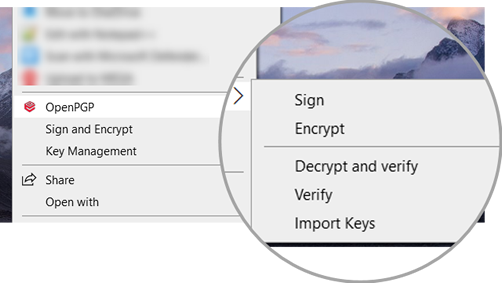
In the latest release, Encryptomatic OpenPGP now includes Windows desktop functionality and integration with the Windows right click context menu.

Screen shot showing OpenPGP integrated with Windows desktop right click context menu. Capabilities incude Sign and Encrypt, and Key Management..

By downloading and running the signed installer package, Encryptomatic OpenPGP will integrate with Windows desktop and Microsoft Outlook (if available), then launch a wizard that will guide new users through the process of creating a key pair.


For information on downloading and installing Encryptomatic OpenPGP, visit the product homepage.


26 March 2020

Working at Home?

We won't spend too much time here recapping current events.  You know what's going on.  And you're probably working from home right now as you read this.

Encryptomatic LLC has been a digital company from the moment of its founding in 2005.  100% of our employees and contractors are able to work remotely. Its a way of working to which we are fully accustomed.  It has been a bit of a surprise to us just how much of the world is finally getting around to working online.

Since last week, things have slowed a bit for us, so if you have any questions about working online, or about how we work, or the tools we use, or whatever... feel free to connect with us.  We enjoy hearing from people like you, and are always glad to help in any way we  can. 

We are a small company. We are real people.  If we can do anything for you right now, we will be glad to try to help.


07 January 2020

Sending Large Email File Attachments from Microsoft Outlook with OutDisk SFTP Add-in

Businesses have long struggled with email file attachments.  Large file attachments in email are likely to bounce, failing to be delivered to the recipient. When they do arrive, they put a strain on server inbox resources.  Email file attachments also present a security risk from virus phishing attempts, causing email administrators to quarantine or strip the file from the email message.

There are plenty of 3rd party services who will provide email file attachment hosting for a fee.  Storing data outside of the organization and depending on the security protocol of the 3rd party provider is a great solution for some companies, but for those who use Microsoft Outlook and want more control of outbound email data, there is OutDisk SFTP.

OutDisk SFTP is an add-in that integrates with Microsoft Outlook 365/2019/2016/2013/2010. When an a sender attaches a file of any size to an email, OutDisk SFTP processes it without any additional requirement being placed on the sender.

In  seamless operation, OutDisk SFTP removes the attachment from the outbound email, uploads it over encrypted secure FTP to a company controlled server, and inserts a link and message into the email instructing the recipient to download the file.  Only the message and link are sent through email, while downloading the file occurs over secure TLS via https protocol.

OutDisk SFTP is free to try. If your organization needs an affordable and effective way to help your email users share files, while maintaining control on company servers,  try OutDisk SFTP.


OutDisk SFTP add-in installed in MS Outlook 365 menu system.
OutDisk can be manually activated, or automatically activated whenever an email file attachment is added to an email.

OutDisk SFTP Windows desktop application screen shot.
OutDisk also works from the Windows desktop. Outlook isn't required to use OutDisk SFTP.

Location of OutDisk SFTP Settings button and connection properties.
OutDisk SFTP Settings and connection properties.


Screen image showing how to change the default OutDisk SFTP message that is inserted into email.
The email default text inserted by OutDisk SFTP may be customized.

Screen image showing how to setup your SFTP server in OutDisk.
Configuring your SFTP server settings in OutDisk SFTP add-in.

Screen image shows a message log reporting "Test completed successfully."
Testing your SFTP connection.

Screen image shows the message and link that OutDisk SFTP has inserted into the email.
What recipients receive in their email inbox.

Image showing the settings for compressing Outlook email file attachments into a single zip file.
OutDisk SFTP supports file compression.

OutDisk SFTP default settings lets you control how OutDisk functions.
Default Settings in OutDisk SFTP


05 December 2019

An update for MailDex 2020 email manager is now available.

Encryptomatic LLC has released an update to their MailDex 2020 email management and conversion software.  Version 1.4.6 is an update that is recommended  for all customers. It solves several user reported issues and includes the latest performance and user interface improvements.

This update is available to all customers with a current MailDex support and update contract.   To update within MailDex, go to Help > Update Software.

The issues resolved include:
MDX228 & MDX119: The message count was incorrect for MBOX formatted emails
MDX346: A crash may occur when a certain column is maximized
MDX347: Index process sometimes became unresponsive with MBOX
MDX348: Improved single PDF conversion performance for MBOX files
MDX349: Now handles corrupted attachment names for MBOX files
MDX345: Advanced Search was relocated for improved ease of use

Screen image showing the location of email Advanced Search in MailDex software.
Location of Email Advanced Search

MailDex by Encryptomatic LLC is an advanced Windows software tool for indexing, searching and converting multiple email formats.  Use MailDex to create a searchable index of millions of email messages.  MailDex supports Outlook pst, ost, msg, as well as mht, mbox, and eml email files.

Get a free 15 day trial of MailDex on the official MailDex product home page.


06 November 2019

Encryptomatic OpenPGP for Outlook is Updated

Encryptomatic OpenPGP add-in for Microsoft Outlook has been updated. The latest version is 2.6.5 and is now available for download.

This release resolves several user reported issues and is recommended for all users.

The numerous enhancements in this release include:
  • Improve message wording for unsigned messages.
  • Added an option to decrypt attachments only.
  • Improvements to text formatting.
  • Allow extending a key's validity.
  • Fixed an issue with opening signed inline messages.
  • Resolved issue where auto conversion from html body to plain text body adds extra spaces to the message text.
  • Improved decryption trigger for non encrypted emails.
  • Resolved  an issue where selecting today's date as expiration date when creating key produces wrong expiration date (+>100 years).
  • Fixed problem where Add in can not open signed multipart message.
  • Resolved issue where Detail box after decryption does not open if something failed or if message is un-signed.
  • Resolved issue where key creation and expiration time are not UTC https://tools.ietf.org/html/rfc4880#section-3.5
  • Fixed an issue where signature verification may fail when it should be successful.

Encryptomatic OpenPGP is an add-in for Microsoft Outlook 2010, 2013, 2016, 2019/365 that brings OpenPGP email encryption to the Outlook toolbar. It is used by companies and individuals to send end-to-end public key encrypted email messages from Outlook,

Learn more about Encryptomatic OpenPGP at our website, and download the software.  Encryptomatic OpenPGP is free for personal, journalism, activist and non-profit uses, and very affordable for business/government uses.

19 August 2019

Email Search Visualization Graphs and Charts Now in MailDex 2019

Search Results Visualization: shows different charts and graphics produced from an email search using MailDex.
Visual Your Email Search Results

The latest update to MailDex 2019 email management and conversion system now includes the ability to visual email search searches.  The MailDex team is happy to bring this advanced functionality to our customers, which has previously been the domain of expensive email discovery service providers.

MailDex 2019 creates a searchable index of your email content.  Indices are project based, and you can create as many email indexing projects as necessary.  Projects can be created and disposed of according to your needs.  Deleting a project does not delete the email content, just the email indices.

MailDex 2019 is useful for archiving and discovering email content.  At $129.99 per license, MailDex provides high email content management features at a competitive price point.

Searching Email

MailDex provides two search methods.  With MailDex Simple Search, simply enter a single search term. MailDex will create a list of all emails in the index that contain that term.

MailDex's Advanced Search allows you to create complex search results using regex terms.
Advanced search lets you build and store searches that contain multiple terms,  as well as excluding other terms. Advance search can search a specific date range.

Advanced Search form in MailDex. Screen image shows functions for creating an advanced email search that includes multiple match criteria.

MailDex 2019 Advanced Email Search.

Free Trial


This MailDex 2019 update is available to all MailDex users by updating through the MailDex software update system.

A 15 day free trial of MailDex 2019 can be downloaded from the product home page at Encryptomatic.com/MailDex/Download

No credit card or personal information is required to run the MailDex free trial.
The free trial may be converted into the full version by purchasing a license activation code.
Software licenses for MailDex are perpetual.
MailDex 2019 requires Windows 10, 2 GHZ processor, 2 GB disk space, and 4 GB RAM (more is better).


01 June 2018

Encryptomatic OpenPGP Add-in for MS Outlook is Updated

Encryptomatic OpenPGP add-in for Microsoft Outlook 2010/2013/2016 has been updated.  Version 2.5.2 is now available for download from the product homepage.

This is a recommended update for all users.  It addresses concerns around the widely reported eFail exfiltration technique.  While our analysis did not confirm the success of eFail with Encryptomatic OpenPGP and MS Outlook, we have implemented further precautions. 

This new release includes security enhancements that will warn users for emails without MDC validation and signature verification. We have also provided more control to you to be informed and receive security warnings. 


Changelog:
EPGP-191    eFail security enhancement    Implemented
EPGP-180    Error message is displaying without any message    Fixed
EPGP-187    Review labels and instructions in new EFAIL related security feature    Adjusted
EPGP-177    GUI improvements    Implemented


26 April 2018

Encryptomatic OpenPGP Add-in for Outlook, version 2.5 released

We've updated Encryptomatic OpenPGP email encryption add-in for Microsoft Outlook! Version 2.5 is now available. Please update through your software [options > settings > check for updates], or download from the official Encryptomatic product website. https://www.encryptomatic.com/openpgp/
This release solves several errors reported by users and improves the user interface.

Screen shot showing how to update Encryptomatic OpenPGP for MS Outlook from within the software.
Update Encryptomatic OpenPGP for MS Outlook

Send any questions to Encryptomatic Support. You can use the "Chat" button on our Facebook page, or aEncryptomatic.com.

01 September 2015

What is the Best Email Encryption Software For Microsoft Outlook? Four Add-ons Reviewed. (Part 2)

This is the second article in a two part series that examines the four email encryption add-ons developed for Microsoft Outlook by Encryptomatic LLC. I will assume you have absorbed the basic idea between symmetric and assymetric encryption schemes in part one.

Why does Encryptomatic LLC offer four different add-ons for encrypting Outlook email?  Why not just one? Each add-on has a sweet spot based mainly around processes.  It's no use sending a highly secure message to someone who will never be able to read it. Likelywise, if there is very little protection, then the message is probably best left unsent.

All of add-ons, if used responsibly, can provide a high degree of privacy for the message, especially against non-state actors. If you want to protect your message from people inside your company, your ISP, or Google, then any of our addons will suffice.  If you are trying to avoid NSA eavesdropping, then the best answer for you is OpenPGP.

Encryptomatic OpenPGP


Our new OpenPGP add-on for Microsoft Outlook will join our product lineup in late 2015. It is currently in beta. If you are interested in trying the beta, please email supportline at encryptomatic.com

We decided to create this product after listening to customers who were required to use OpenPGP to communicate with insurance companies.  They had no choice in the selection of the encryption method; they had to use OpenPGP, and they were struggling with the cost and complexity of installing it.

We also learned that some of the offerings available were simply not working very well in Outlook. They were difficult to use, and referenced outside applications for key management.  While Encryptomatic OpenPGP is still a work in progress, we believe that compared to other addons in the market, ours has the easiest setup and implementation process, a fair price (free for personal use) and a use process that is simple and unobtrusive.
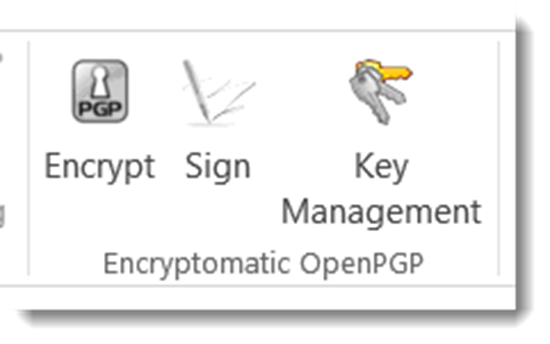
OpenPGP email encryption add-on for MS Outlook.
Encryptomatic OpenPGP addon toolbar installed in Microsoft Outlook
Encryptomatic OpenPGP provide the ability to encrypt, sign and manage keys, and is interoperable with other PGP software.  We recommend Encryptomatic OpenPGP wherever PGP is used, and when security and privacy trumps convenience.  As OpenPGP integrations with Microsoft Outlook go, we think you'll find our software to be the most useable available. If not, please let us know and we'll make it better.


Price: Encryptomatic OpenPGP is free for personal use.  Contact support at encryptomatic.com for business pricing.

Lockbin


Lockbin is a service for secure communication build around convenience, and the ability to send a message to anyone. It is typically used by doctors, lawyers, accountants, transcriptionist,  and other smaller office professionals who need an effective and practical way to communicate with  patients, clients and customers who are not sophisticated enough to implement OpenPGP.

Although Lockbin has a free add-in for Microsoft Outlook, the secure messages can also be retrieved by signing in to Lockbin.com,  on an Android app, or through the Lockbin Java application.

Screen shot showing the icons of the Lockbin toolbar in Outlook 2013.  The icons are titled: Settings, Receive Messages, and Send Request
Lockbin email encryption toolbar in Microsoft Outlook.
Lockbin uses public/private key encryption, but has simplified the process.  All messages on the Lockbin servers are encrypted at all times. No private keys are accessible on the servers, even to staff.

Lockbin gives you the ability to easily send secure messages to anyone. When you want to send a message to someone who is unknown to Lockbin, it will send an invitation to the recipient inviting them to a free account.  The signup process is free, immediate, simple, advertising free and non-invasive. 

Lockbin works best when both parties have a Lockbin account, but you can optionally send a password protected symmetric key encryption message to the recipient.

Price:
There is no charge for the Lockbin add-on for Microsoft Outlook.  Lockbin basic accounts are free. Premium accounts start at $4.95 per month for a single user, with discounts for multiple users.
Download the Lockbin addon for Outlook.

PDF Postman
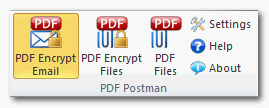
PDF Postman toolbar in Outlook 2013. Buttons read "PDF Encrypt Email," "PDF Encrypt Files," and "PDF Files."
PDF Postman encryption addon for Microsoft Outlook

PDF Postman is intended as a uni-directional communication process. That is, if you need to privately send a message and/or file to someone who cannot be bothered to sign up for anything or install special software, and a reply is not expected, then PDF Postman may be a good fit for you.

PDF Postman uses the common Portable Document Format, aka PDF files, to protect your messages.  AES-256 bit strong encryption is built into the PDF specification. Any spec compliant PDF reader such as Adobe Reader, can decrypt a PDF Postman message. This is useful because it means PDF Postman messages can be opened across any device platform: Windows, Linux, iOS, Android -- any device that has a compliant reader.

To open a PDF Postman encrypted PDF file, the recipient simply clicks on it. The encrypted PDF file is automatically loaded into the viewer, which recognizes that the file is encrypted and asks for a password.
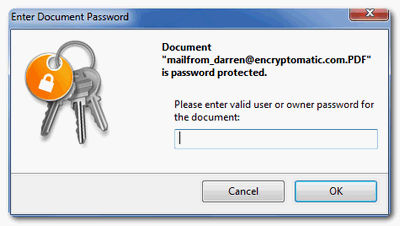
PDF Exchange viewer prompting "Please enter valid user or owner passwrod for the document."
PDF viewer prompting for a password.
 When the correct password is entered, the PDF message can be viewed.

Price:
PDF Postman is $69.99 for a single license and one year of updates and support.
Download a free trial of PDF Postman

MessageLock
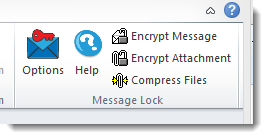
MessageLock toolbar. Text reads, Options, Help, Encrypt Message, Encrypt Attachments, Compress Files.
MessageLock toolbar in Microsoft Outlook

MessageLock is a simple and seamless end-to-end email encryption option for Microsoft Outlook. It is at its best when all users have Microsoft Outlook and MessageLock.

MessageLock can be sent to automatically encrypt messages to other MessageLock users. This is convenient and makes sending secure messages a essentially a background task that does not interrupt the sender or recipient.

MessageLock supports using different passwords for sending and receiving messages. Messages may be decrypted automatically when received and placed in the normal Outlook e-mail list.

If you will be regularly communicating with a small group of other Outlook users and end-to-end privacy is desired, then MessageLock may be right for you.

MessageLock also has an integration with Lockbin, so that you can send and receive messages through the Lockbin service. This makes MessageLock useful as both a end-to-end system, and as a "send to anyone" system.

Price
MessageLock is $49.99 for a single license and one year of updates and support.
A free 15 day trial is available to download.

Which Email Encryption Add-on Is Best?

If you are still unclear which of the four Outlook email encryption add-ons we discussed is best for you,  just try them!  All are available on a 15 day free trial.

If you have any questions, post them in the comments below, or email us our Sales team at sales at encryptomatic.com. You can also call us, 1-651-851-4902.

We are always willing to listen to your situation and recommend the best product to fit your specific situation.





09 September 2014

MessageExport maintenance release, 2.3.6.0, now available.

Hello All,

We have updated MessageExport 2.3.6.0. This is a maintenance release. It's optional, but we recommend it for all customers because of some fixes that were made to PDF search capabilities.


MessageExport Change Log:
================================================================================================
Version - 2.3.6
================================================================================================

- 0003834: [Add] "Browse for folder" dialog improvded
- 0003879: [Fix] Resolved an odd issue related to the PDF component used in MessageExport, wherein the word "Attachment" may not have been searchable in resulting PDF files. 
- 0003168: [Fix] Resolved another odd issue involving small font after exporting some "RE:" messages to PDF
- 0003413: [Fix] Improved exporting docx attachments, and resolved an issue relating to a specific docx attachment that a customer sent us. 
- 0003580: [Fix] Improved "Const '.'" in naming schema
- 0003431: [Fix] Header information may have been exported incorrectly. We fixed it.
- 0004039: [Fix] Some Windows XP users were seeing an Error message involving a .cab file. This is now resolved. 

MessageExport is an add-in that expands Outlook's ability to export email messages to PDF, MSG and many other formats.  People use MessageExport in creative ways to automate their work with email.