Showing posts with label pdf. Show all posts

10 March 2022

MailDex Email Manager Updated to Version 1.5.50

It has been a lot of work, and today we are happy to announce the availability of MailDex update 1.5.50.  In this update we set out to rewrite our mail indexing engine to improve speed and accuracy. Working with customers we were able to incorporate numerous suggested improvements and enhancements. 

MailDex lets you index many different email types and then search and convert them. We invite you to try MailDex free for 15 days.

For those who may have been tracking a specific issue, the changelog is provided below for transparency.


MailDex software box illustration showing 30 day money back guarantee. MailDex envelope logo and Encryptomatic LLC logo also are present.


Changelog MDX 1.5.50


Issue resolutions:
MDX-522 Search Display indicator issue resolved.
MDX-521 Search is improved
MDX-519 Commandline export error and fails to process, resolved.
MDX-514 Export Speed settings improved
MDX-513 End of Stream error when indexing EML files is fixed
MDX-512 Indexing process not displayed is fixed
MDX-510 Improved indexing of Powerpoint files
MDX-507 OST to EML conversion improvements
MDX-505 Improved indexing of pst/ost files from MS Outlook
MDX-448 Export emails to MBOX file is improved
Story
MDX-527 Some in house created files fail to read (resolved)
MDX-526 The method or operation is not implemented (resolveD)
MDX-503 Options to export visuals added.
MDX-317 Errors shown while indexing and enumeration is resolved
MDX-306 Extremely slow export related to Single PDF Attachments imaged, resolved.
Sub-taskMDX-517 SingleXML export fails for PST fileTask
MDX-528 Data error (cyclic redundancy check)
MDX-520 Delay on folder delete
MDX-515 Support .EMLX format (apple email files)
MDX-506 SingleXML export fails
MDX-502 Indexing is not triggered by the new version on existing files.


What is MailDex?

MailDex® by Encryptomatic® LLC is a Windows® software tool for indexing, searching, discovering and converting emails. MailDex works across many email client formats, including Outlook .pst, .ost, and .msg files, and Thunderbird's .eml, .mbox, as well as winmail.dat, and .mht files.

With MailDex, you can discover those few important emails hidden among millions. Use MailDex to organize, find, archive, and discover important email content

08 March 2022

MessageExport Update Has Been Released (4.0.285)

MessageExport, the email export add-in for Microsoft Office Outlook, has been updated. We recommend that customers with a current software support subscription update to the latest release.

This release includes numerous improvements including:


ME-163 Add a numerical increment option that can be added to file names.


ME-161 Option to strip URLs from emails during email-to-text file conversion

ME-158 Suppress or automatically shorten the name of a file if it exceeds the limit

ME-136 Separate History and Marked options

ME-168 Updated System requirements

Several user reported bugs were prioritized and resolved in this release: 

ME-164 Unable to convert body text and certain images
ME-159 Metadata fields not imported to the preview
ME-153 Root element is missing. System.Xml
ME-165 Ability to print with remote images
ME-152 Broken feature: Attachments before body


About MessageExport Add-in for Outlook:

MessageExport is the premier tool for extending Outlook's capabilities to format, copy, name, and convert e-mail messages to PDF and other formats. MessageExport is used all over the world by thousands of large corporations, state and national governments and professional offices. MessageExport works with Windows versions of Microsoft Office Outlook to accomplish time consuming e-mail export tasks quickly. Operations requiring three or four steps to export, convert, name and copy e-mail messages can now be done in a single step with MessageExport

Visit the MessageExport home page at Encryptomatic.com/messageexport and download the 15 day free trial.

09 October 2018

MailDex® Supports Compatibility with Controlled Unclassified Information (CUI)


At the request of our valued clients who work with the U.S. government, we have added a feature to Encryptomatic MailDex® to automate compatibility with Executive Order 13556 “Controlled Unclassified Information,” or CUI.

This order was issued on November 4, 2010 to standardize and simplify the way the Executive branch handles important unclassified information that requires safeguarding or dissemination controls. 


Screen shot of MailDex software Export tab, showing location of "Exclude CUI" option.   Image © Encryptomatic LLC. All rights reserved.
MailDex option to ignore CUI content during exports.
To activate CUI compatibility, locate the "Export" tab in MailDex. 
MailDex will now ignore CUI tagged content during export operations.


MailDex software box.   Image © Encryptomatic LLC. All rights reserved.
Try MailDex free for 15 days


MailDex® and Encryptomatic® are registered marks of Encryptomatic LLC. 

04 September 2018

MessageExport add-in update 4.0.164

MessageExport add-in for MS #Outlook 2016 has been updated. This release includes new requested features and a few bug fixes. 

MessageExport saves you time by automating bulk processing of email conversion tasks, such as converting to PDF, saving email to CSV, and many other things.

 Learn more and download a free 15 day trial.

17 February 2016

MessageExport 4.07 maintenance release now available.

Encryptomatic LLC has released a maintenance update for MessageExport add-in for Microsoft Outlook. This update is an optional but recommended update that resolves some installation issues due to Microsoft's SmartScreen filter.  In 2016 Microsoft deprecated signing SHA1 code signing certificates, causing SmartScreen to issue a warning when installing software. This update incorporates a stronger Sha2 codesign certificate to placate Microsoft.

Shows MessageExport installed in Outlook toobar.
MessageExport for Outlook is updated for version 4.07

15 December 2015

Becoming an Email-to-PDF Conversion Jedi

When Stars Wars launched in 1977, relatively few people had ever heard of email, let alone received one. Even though other forms of messaging have largely overtaken email in our personal lives, business and customer communications often are sent by email because of it's open characteristics. The same openness that has allowed spam to become a huge problem for email administrators is also what makes it useful for communicating with customers and others who want to do business with our organizations.

At Encryptomatic LLC, we are focused on helping our customers manage their e-mail content. One of the important tasks that help people perform is converting email into different formats. In particular, PDF portable document format.  PDF is everywhere. It's used for storing, organizing and sharing email across platforms.

Our customers frequently find our products after spending days trying to cobble together an email-to-pdf conversion solution. While installing a PDF print driver sounds like a reasonable way to go, and is often cited as the first method that our customers try,  the problems of this method quickly become aparent.

PDF print drivers just can't handle complex email formatting, and they don't offer the functionality that quickly becomes an obvious need:
  • They don't provide custom file naming, forcing you to manually name the files
  • They can't handle email file attachments automatically
  • They can't export email in bulk
  • Bulk exported email can't be organized in subfolders
  • and so on...
Encryptomatic LLC offers products that push the traditional limitations on email conversion, addressing all of the aforementioned problems.  Ten years of listening to our customers and dealing with their issues have helped us to develop an uncommon set of products that help you get your email conversion work done accurately and quickly.

Email messages that can not be accurately read, printed or converted by competitor's products will probably render just fine in our software. If they don't, let us know and we will code a fix.  Over the years our developers have discovered and coded solutions into our products for hundreds of unique and uncommon format exceptions that exist in the wild.

Yes, there are published email specifications that if respected to by all developers would make life much easier for software developers.  The reality,  however is that there are many email clients and applications that produce poorly formatted email content.  Our email rendering engine, MVCOM is probably the most accurate and expansive product of its type ever developed.  MVCOM drives the rendering of email content in PstViewer Pro, and MsgViewer Lite, two of our email viewing products.

For Microsoft Windows Office Outlook users, MessageExport  vastly expands and simplifies converting Outlook email to PDF and many other formats.  It lets you automate routine email export tasks, and perform PDF conversion with uncommon simplicity and utility.

Screen image of MessageExport toolbar in Outlook 2016.
MessageExport add-in for Outlook.

We hope you'll take our products for a test drive. They are well worth the price. It will not take you very long to recover your investment in our products in time savings and productivity.  The average moderately-heavy MessageExport user recovers their investment in about one week.

Thanks for stopping by, and feel free to post any questions for us here. We love to hear from you.

20 January 2015

MessageExport 3.5 Released

MessageExport has been updated to version 3.5.  This version of MessageExport includes the new capablity to export embedded email attachments.  Now if you export an email message to PDF that has a .msg or .eml email attachment, MessageExport will process those embedded emails in a logical manner.

This release of MessageExport also includes the ability to select multiple folders for each export profile. 

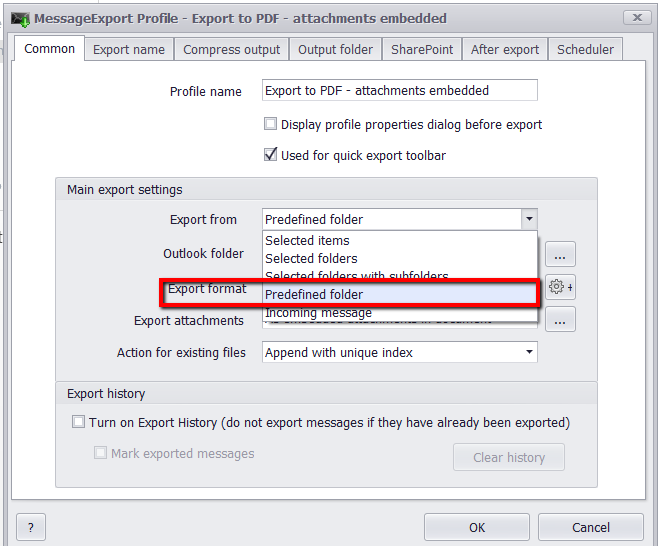
Existing users will understand that an export profile is a set of instructions that you can quickly execute against a set of email messages.  Using Export Format: Predefined Folders, you can now run an existing export profile against a group of selected folders, rather than only one specific folder. This greatly enhances the usefulness of export profiels.

To set this feature, edit an Export Profile, then go to the Common tab. Click "Export From" and choose "Predefined Folder."

Export Email From Predefined Outlook Folders

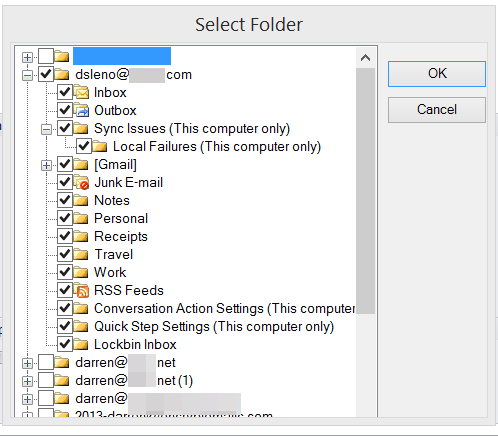
You can now indicate the folders that you want this profile to run against by placing a check in the box.
Select Outlook Folders.

Learn more about MessageExport and download a free trial from https://www.encryptomatic.com/MessageExport

29 March 2013

MessageExport Add-on for MS Outlook Update Is Released


Encryptomatic LLC has released a maintenance update for MessageExport version (2.2.5.2700).
 
- Resolved an issue relating to export of emails to MBOX format
- Added support for very large PDF files
- Added support for localized versions of Outlook 2003
- Resolved an issue around releasing the license activation during uninstallation on 32-bit platforms.
- Removed an annoying dialog message from the Export Scheduler
- Hotfix for Outlook 2013 x64
- Improved Enterprise Vault support

MessageExport is an add-on for Microsoft Outlook. It can be used to convert convert Outlook emails individually, or in large batches.  Supported email conversion formats include .PDF, .CSV (for import into MS Excel), .EML, .MSG, .JPG, .TXT, .MHT, .GIF, .TIF.

Current customers can update through their software as part of their updates and support program. New customers can download a free trial of MessageExport.

Screen shot of MessageExport running in Outlook 2013.
MessageExport Add-on In Outlook 2013


23 April 2012

MessageExport for Outlook - Update Released


MessageExport maintenance release version 2.1.0.2416 is now available.

This build resolves an issue with long names and converting .xlsx files.

Current customers with a license key may download the update here:

To download a free trial, click here.

MessageExport is the add-in that extends Microsoft Outlook's ability to export email messages and file attachments to different formats and to different places, in very flexible ways.

MessageExport can convert Outlook email messages to PDF and many other formats. MessageExport supports exporting a single message, or thousands of messages at once.  Custom export operations may be created and run on a timed schedule.

Follow this link to learn more about MessageExport for Outlook.

27 April 2011

PDF Postman for Outlook: Email Encryption Made Easy

Encryptomatic LLC today announced the release of it's newest product, PDF Postman(tm), an add-in for Microsoft Office Outlook.  PDF Postman leverages the cross platform ubiquity of the PDF portable document format to securely deliver email messages and file attachments to recipients on virtually any computing platform supported by modern PDF readers, including Windows, Mac, Linux, and mobile platforms such as Android.


More information and a free trial of PDF Postman is available at https://www.encryptomatic.com/pdfpostman/
The full press release can be found at
https://www.prleap.com/pr/175937/