Showing posts with label PstViewer Pro. Show all posts

27 December 2023

Pst Viewer Pro Email Viewer Update Is Now Available.


We have released an update to Pst Viewer Pro, our Windows software for viewing and converting emails.
Issues Resolved in build 9.0.1720.0:
PVP-529 Improve RAM utilization
PVP-530 Improve loading emails
PVP-531 Fix encoding on displayed messages
PVP-440 Mail Actions are not working

You can update through the software, or download it from https://www.encryptomatic.com/pstviewer/
Anyone needing support to update, please email supportline@encryptomatic.com or call 701-566-6731 x2

Pst Viewer Pro is a multi-format viewer for emails stored as PST/OST/MSG/EML/MBOX/MHT format. A 15 day free trial is available.

Pst Viewer Pro is built on MailDex.Lib .NET Library by Encryptomatic LLC.


Tags: #pstviewer #pstviewerpro #email #emailViewer

31 January 2023

Pst Viewer Pro™ 2023 Update is Now Available

Pst Viewer Pro 2023 software box illustration. 30 day money back gurantee. 15 Day Free trial.

Fargo, ND - The development team at Encryptomatic®, LLC is pleased to announce the release of Pst Viewer Pro 2023. This is a major release that is recommended for all customers. It resolves more than thirty issues and numerous improvements and enhancements.  

For this release, we are including our new proprietary email parsing engine which improves speed, processing, and rendering accuracy. This is now the same engine used in our advanced MailDex® email manager. 

Pst Viewer Pro is the original multi-format email viewer for Windows.  Since 2006, PstViewer Pro™ by Encryptomatic® LLC has been used by individuals and  professionals to organize, discover, print, and convert Outlook emails to PDF and many other formats. Outlook is not required to be present on your computer for PstViewer Pro to work. It works across Outlook PST OST MSG email files, and also MBOX, MHT, EML emails. 

A screen image of Pst Viewer Pro 2023's main UI. Email files are selectable on the left hand side.  An email list appears above the email preview.  Toolbar runs along the top.

How to Upgrade to Pst Viewer Pro 2023

Customers with a current maintenance and support service are able to upgrade from within Pst Viewer Pro by going to Help > Check For Updates.  Please contact our support team if you have any questions or require assistance.

The update can also be installed by downloading the installer from our website.

Customers without a current maintenance and support service are encouraged to contact our support team for upgrade offers.

For more information about capabilities and pricing or to obtain a 15 day free trial, visit the official Pst Viewer Pro home page.

New Features

PVP8-446 Add the ability to 'turn off' remote image download

PVP8-457 Upgraded Email library

PVP8-494 Upgraded the PDF processing engine

PVP8-495 Improved installer packaging

PVP8-493 Added a new "Browse to folder" for Windows 11

Resolved Issues

PVP8-373 Improved Chinese characters decoding

PVP8-401 Improved Mail Actions

PVP8-476 Improved Enumeration process

PVP8-458 Update splash screen copyright

PVP8-459 Underscore before text on most legends

PVP8-460 Update activation window text 2022-2023

PVP8-461 Resolved Error when accessing folder.

PVP8-462 Resolved an email access error

PVP8-463 Software crashed after selecting a folder with MSG files

PVP8-464 Fixed EML to PDF might output a PDF file with 0KB

PVP8-465 Resolved a license activation issue

PVP8-466 Resolved MBOX files load issue

PVP8-467 Resolved display preview file with some MHT files

PVP8-468 Resvolved error, unable to access PST file

PVP8-471 Resolved issue where Property tree may not generate

PVP8-488 Resolved an issue with Explorer tree truncated when scrolling

PVP8-489 Resolved issue where counted search items may be inaccurate

PVP8-490 Improved adding items to favorites

PVP8-491 Resolved issue where file explorer is not working correctly

PVP8-492 Resolved issue with Properties button on Explorer tree

PVP8-497 Improved the Single Export to Docx process

PVP8-498 Resolved an issue with XML export

PVP8-499 Improved displaying duplicate attachments for EML format

PVP8-443 Improved Command-line exports results

PVP8-500 Fixed an Error that could occur during saving attachment in the EML file

Free Trial

PstViewer Pro is available for a 15 day free trial.

For more information, visit https://www.encryptomatic.com/pstviewer/ or email us at supportline@encryptomatic.com. 

About Encryptomatic LLC

Encryptomatic LLC is a developer of customer-centric Microsoft Office solutions that protect the privacy of our customers email communications. Our products are widely available through an international online distribution network.

Founded in 2005, we are based in Fargo, ND, central to thousands of freshwater lakes brimming with Walleye and Northern Pike, where we enjoy outdoor sports, clean air and short commutes.

Encryptomatic® and Pst Viewer Pro are trademarks of Encryptomatic LLC
Microsoft® and Outlook® are registered marks of Microsoft Corp.

© 2023 Encryptomatic LLC  Fargo, ND USA

19 April 2021

PstViewer Pro 2021 version 9.0 is Released.

 PstViewer Pro 2021 has been released. This is a major update to our popular email viewer and converter.  With PstViewer Pro 2021 (version 9), major improvements have been made to the speed of exporting email to PDF documents.


PstViewer Pro 2021 main screen.


PstViewer Pro is an email viewer for opening Outlook .pst/.ost/.msg/winmail.dat email files, as wells .eml and .mbox email files.  PstViewer Pro can be used to search for email messages, and to export email messages either individually or in bulk to pdf, gif, tif, docx, csv, xls and many other formats.


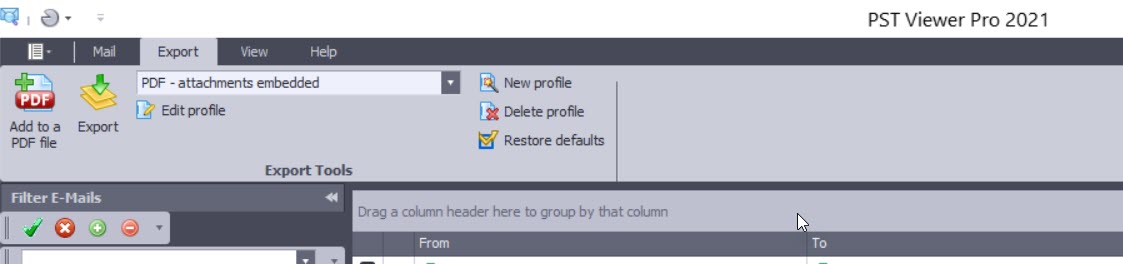
Screen image showing PstViewer Pro export menu.

A free trial of PstViewer Pro can be downloaded from the product home page.

For assistance in installing or uninstalling the software, contact Encryptomatic Support.

Improvements in PstViewer Pro 2021:

Software improvements and resolved issues in this major release are shown below. We have retained some of the issue numbers, in case you were tracking a specific issue.

- Single PDF export Imaged and Embedded restriction implemented with a warning if too many emails are embedded.

- Individual PDF export performance significantly improved

- ISO/A conversion performance has been enhanced

-  A issue in Mail Actions has been resolved. (PVP8-401)

- An issue with html links is resolved. (PVP8-408)

- Favorites tab has been enhanced (PVP8-403)

- Excel files convert in Single PDF exports is improved (PVP8-368/PVP8-378)

- UI issue for selected items is fixed (PVP8-399)

- Single Docx file restriction implemented to prevent performance issues.

- Single PDF conversion with MBOX is resolved. (PVP8-380) Restriction applies to this fix as well.

- Resolved issue where non-convertible attachments were sometimes not embedded on the output PDF (PVP8-396)

- UI Bug for the side pane (minor) PVP8-410

- Long build up time for Single Docx files (PVP8-414)

- Predefine/detect last email exported with the Single PDF restriction and move highlight to that email or auto batch convert the next 1000 emails from the last exported (PVP8-415)

- Adjust the profile naming schema for Folder tree PDF and copy (PVP8-412)

22 August 2018

3 Simple Ways to Open .EML Email Files

So you have some files with a .eml file extension and you are wondering how to open and search them?  There are different ways to do this. This article will walk you through a few Windows software tools you can use to manage .eml files.

What is a .eml file?
They are individual email files, usually in text format although they can include html.  They conform to a published standard (RFC-822). Most email applications like Mozilla Thunderbird, Microsoft Outlook or Lotus notes can open .eml files.

Simple Way to Open .EML Files #1


If you only have a few .eml files, you don't need to install any software on your computer. Just use our free online email viewer, which uses the same email parsing engine that we use in our desktop software. Upload the .eml file and it will be displayed in your web browser.   You will be able to download any file attachments to your computer.  

Your email message is not retained, and is permanently destroyed when your session ends.  We have provided this service free for five years, and it is used each day by thousands of people.

25 February 2016

MBOX File Support Added to PstViewer Pro Version 8.0

Today we are releasing an update for PstViewer Pro. Version 8.0 is now available for download. This is a recommended update for all eligible customers.

Image of PstViewer Pro with MBOX selected.
PstViewer Pro now supports viewing/converting MBOX files.

PstViewer Pro now includes support for viewing searching and converting emails stored in ‪#‎MBOX‬ files. Mbox files contain multiple ‪#‎email‬ messages and their file attachments.  Mbox files are created by many different email clients, including the popular Mozilla Thunderbird client.

This capability is included in the latest PstViewer Pro download (v8) and is available to all customers who purchased EmlViewer Pro in the past year, or who have an updated support/maintenance plan. Contact supportline at encryptomatic.com with any questions!

20 October 2014

PstViewer Pro maintenance release available.


PstViewer Pro email viewer for Microsoft Windows has been updated. 

For more information on PstViewer Pro, please visit https://www.encryptomatic.com/pstviewer/

Changelog:
========================================================================================
Version 6.0.357.0
========================================================================================

- 0003818: [Add] Date format “yyyy-MM-dd” 
- 0004336: [Add] Release license when PVP is uninstalled
- 0003892: [Add] Ability to print every message starting from new page 
- 0004329: [Fix] Crash on attempt to delete an email from pst file
- 0004005: [Fix] Error message when checking for updates 
- 0004175: [Fix] Error when exporting specific EML message 
- 0004212: [Fix] Registration from command line with PIDKEY parameter 
- 0004261: [Fix] Printing to PDF changes signature and font color 
- 0003819: [Fix] Date format is displayed as 12-hours 
- 0003542: [Fix] Folders like "Libraries" and "Control Panel" don't get opened in Explorer 
- 0003839: [Fix] Search for .MSG and .EML files 
- 0004108: [Fix] Search and Filter functions return different results on the same query 
- 0003946: [Fix] 24-hours format for Sent/Received time 

04 June 2014

PstViewer Pro email viewer is updated

PstViewer Pro has been updated! Version 6.0.0.294 is now available. It improves a number of functions around reply/forward/reply all operations, especially with .eml and Windows Exchange. 

You can download the update through your PstViewer Pro software.  A free 15 day trial can be downloaded from https://www.encryptomatic.com/pstviewer/download.html

Outlook email viewer, PStViewer Pro, is used for seaching emails in .pst, .msg, and .ost and .eml files.
Outlook email viewer, PstViewer Pro.
PstViewer Pro is an advanced email viewing tool for searching, printing, converting, replying and forwarding email content. It works with Outlook .pst, .ost, .msg and .eml email files.  Directories of .msg and .eml files can be displayed in an a mail list.  Double click on a message to obtain a full screen view.

PstViewer Pro can also bulk convert email content and most common file attachments to .pdf and other useful formats.


14 April 2014

PstViewer Pro maintenance update is available

Our software development team has released an update for the PstViewer Pro email viewer.

PstViewer Pro 6.0.0.247 is now available for download. This is a recommended maintenance release that addresses some issues in the search algorithm for .msg and eml email files.

This build addresses the following issues.


  • Search fixes for .MSG and .EML files
  • Error in Outlook when sending an email
  • Problems with Unicode symbols in "Reply" and "Reply all" methods
  • Outlook freezes after "Reply" button is pressed in the email viewer window
  • Correctly open second email window
  • Long attachments names in EML file are cut and displayed without any extension
  • Launch version with correct bit capacity when file is opened from Windows explorer
  • Change trial key type to "offline"
PstViewer Pro is the leading commercial email viewer viewer for .pst, .ost, .eml, and .msg email files.  For more information visit the Pst Viewer Pro home page and download a free trial. 

For assistance installing or updating PstViewer Pro, contact support.


04 March 2014

PstViewer Pro 6.0 Outlook Email Viewer Now Available For Download

PstViewer Pro is an email viewer for the Windows platform. It helps
you to view, search and export email messages stored as .msg, .eml,
.ost, .pst formats.

You can download the version 6 update from our website:
https://www.encryptomatic.com/pstviewer/download.html

In this release you'll notice that there has seen a change to
the GUI to give it a more updated look and feel, and organization
of the tools into tabs.

PstViewer Pro 6.0 email viewer for Outlook content


Here's the full list of improvements included in this release.


- 0003776: [Add] Check Outlook bit capacity to launch exe
file of the same bit capacity. There was a problem with
Reply/Forward functions not working if, for example, you installed
64-bit PstViewer Pro but had the 32-bit version of Outlook. This
check helps prevent those problems.


- 0003746: [Add] Add version number to PVP ribbon, which will make
it easier for you to know which version of PstViewer Pro you are
using if you call our support team.


- 0003720: [Add] Confirmation dialog regarding export profiles
reset to prevent you from overwriting customized export profiles.


- 0003583: [Add] Added Simple Fullscreen mode for fast viewing of
MSG and EML files


- 0003582: [Add] Add "Reply" and "Forward"
buttons to full screen email window


- 0003329: [Add] Added an option to let you export both message and
extracted attachments to the same folder


- 0003332: [Add] Add information on failed conversions


- 0003331: [Add] Add information about number and names of
attachments when exporting to CSV


- 0003139: [Add] Selection of date formats is not available


- 0003403: [Add] Add Attachments Export to the CSV Profile


- 0003390: [Add] "Select All" menu item has been added


- 0003716: [Fix] Resolved an issue where "CC:" field
doesn't get exported to CSV format


- 0003478: [Fix] Resolved an issue where boxes remain checked after
export


- 0003288: [Fix] Resolved a problem with German symbols a o u ?
dislaying
incorrectly after being exported from EML to PDF


- 0003433: [Fix] Attachment extensions are saved incorrectly


- 0002828: [Fix] Resolved a case where a crash occurred while
exporting a specific .pst file. Object reference not set to an
instance of an object.


- 0003399: [Fix] Resolved an issue Proxy settings from the command
line


- 0002820: [Fix] Resolved an issue where user is prompted to
download a temp.html file on each message opening from .pst file


- 0003657: [Fix] Resolved a situation where an EML message body and
attachment may not be displayed.