Showing posts with label openPGP. Show all posts

05 July 2022

Encryptomatic OpenPGP Add-In for Microsoft Outlook is Updated

 We have updated Encryptomatic OpenPGP add-in for Microsoft Outlook. The new update, version 2.7.16, is now available on the product's official home page, or by running the updater within the software.

This update contains improvements suggested by customers and also several bug fixes.  The full list is included here for transparency.

Encryptomatic OpenPGP software box illustration showing email logo with a lock and Encryptomatic LLC logo. 30 day guarantee.

In a nutshell: we fixed several bugs, added new icons, enhanced resolution scaling so the application looks better in Microsoft Outlook and the Microsoft Windows desktop, made things work better with key servers, enhanced our compatibility with Thunderbird's OpenPGP email encryption, added an auto start option for the desktop OpenPGP app, and added encrypting text in clipboard. The full list of improvements for this release is below:

EPGP-358 Encrypting text from the clipboard sometimes causes an exception
EPGP-357 Opening Thunderbird OpenPGP message causes prompts on program exit
EPGP-356 Key servers don't appear keys import dialog
EPGP-355 Added new key servers to our key list
EPGP-354 Opening and closing and opening the "Key Management -> Key Import -> From Key Server" throws exception
EPGP-353 No default button on Generate new key form
EPGP-352 Exception thrown while manually deleting keys from keys folder
EPGP-350 Clicking cancel on passphrase dialog crashes the app
EPGP-349 Change key expiration date updates date to the date in the past or other wrong date
EPGP-347 The cancel button added to Encrypt clipboard form
EPGP-346 Fixed bug where a key failed to update on Windows app
EPGP-339 [Desktop] Sign and encrypt overwrites existing file
Enhancements
EPGP-194 Keyservers in OpenPGP for Outlook
EPGP-348 Make links in enc / dec report clickable so they go to the folder where the resulting files are stored
EPGP-196 Enhanced desktop icons
EPGP-351 Enhance resolution scaling for icons in Add-ins tool bar
EPGP-362 Added an auto start option for the Windows app.
EPGP-344 Enhance resolution scaling with Windows app

EPGP-361 Key Servers improvements


Encryptomatic OpenPGP brings OpenPGP email encryption to Microsoft Outlook 2013 and later, and OpenPGP file encryption to the Windows 10/11 desktop.  It's free to personal users, journalists, non-profit organizations, activists, and very affordable for business and government users. For more information, visit the Encryptomatic OpenPGP product home page.

28 September 2020

Encryptomatic Announces the Availability of OpenPGP for Windows Desktop and Outlook.


We appreciate all of the support we have received from users of Encryptomatic OpenPGP add-in for Microsoft Outlook. Today we are very pleased to announce that we have extended its encryption capabilities to include folders and files on the Windows desktop.  

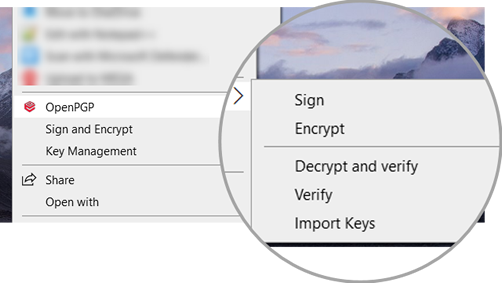
In the latest release, Encryptomatic OpenPGP now includes Windows desktop functionality and integration with the Windows right click context menu.

Screen shot showing OpenPGP integrated with Windows desktop right click context menu. Capabilities incude Sign and Encrypt, and Key Management..

By downloading and running the signed installer package, Encryptomatic OpenPGP will integrate with Windows desktop and Microsoft Outlook (if available), then launch a wizard that will guide new users through the process of creating a key pair.


For information on downloading and installing Encryptomatic OpenPGP, visit the product homepage.


06 November 2019

Encryptomatic OpenPGP for Outlook is Updated

Encryptomatic OpenPGP add-in for Microsoft Outlook has been updated. The latest version is 2.6.5 and is now available for download.

This release resolves several user reported issues and is recommended for all users.

The numerous enhancements in this release include:
  • Improve message wording for unsigned messages.
  • Added an option to decrypt attachments only.
  • Improvements to text formatting.
  • Allow extending a key's validity.
  • Fixed an issue with opening signed inline messages.
  • Resolved issue where auto conversion from html body to plain text body adds extra spaces to the message text.
  • Improved decryption trigger for non encrypted emails.
  • Resolved  an issue where selecting today's date as expiration date when creating key produces wrong expiration date (+>100 years).
  • Fixed problem where Add in can not open signed multipart message.
  • Resolved issue where Detail box after decryption does not open if something failed or if message is un-signed.
  • Resolved issue where key creation and expiration time are not UTC https://tools.ietf.org/html/rfc4880#section-3.5
  • Fixed an issue where signature verification may fail when it should be successful.

Encryptomatic OpenPGP is an add-in for Microsoft Outlook 2010, 2013, 2016, 2019/365 that brings OpenPGP email encryption to the Outlook toolbar. It is used by companies and individuals to send end-to-end public key encrypted email messages from Outlook,

Learn more about Encryptomatic OpenPGP at our website, and download the software.  Encryptomatic OpenPGP is free for personal, journalism, activist and non-profit uses, and very affordable for business/government uses.

01 June 2018

Encryptomatic OpenPGP Add-in for MS Outlook is Updated

Encryptomatic OpenPGP add-in for Microsoft Outlook 2010/2013/2016 has been updated.  Version 2.5.2 is now available for download from the product homepage.

This is a recommended update for all users.  It addresses concerns around the widely reported eFail exfiltration technique.  While our analysis did not confirm the success of eFail with Encryptomatic OpenPGP and MS Outlook, we have implemented further precautions. 

This new release includes security enhancements that will warn users for emails without MDC validation and signature verification. We have also provided more control to you to be informed and receive security warnings. 


Changelog:
EPGP-191    eFail security enhancement    Implemented
EPGP-180    Error message is displaying without any message    Fixed
EPGP-187    Review labels and instructions in new EFAIL related security feature    Adjusted
EPGP-177    GUI improvements    Implemented


14 May 2018

Statement about eFail email encryption vulnerability.

Today we learned through Electronic Frontier Foundation (EFF) of an exploit known as efail that can compromise the text of OpenPGP encrypted messages through a combination of factors.

Developers at Encryptomatic LLC will be studying this issue in the hours and days ahead and will respond with software updates to Encryptomatic OpenPGP for MS Outlook if mitigation is necessary.

EFF is advising all PGP users to pause in their use of OpenPGP email encryption tools and seek other modes of secure end-to-end communication for now. This would include halting the use of Enigmail in Thunderbird, GPG for Outlook, and Encryptomatic OpenPGP for Outlook. 

26 April 2018

Encryptomatic OpenPGP Add-in for Outlook, version 2.5 released

We've updated Encryptomatic OpenPGP email encryption add-in for Microsoft Outlook! Version 2.5 is now available. Please update through your software [options > settings > check for updates], or download from the official Encryptomatic product website. https://www.encryptomatic.com/openpgp/
This release solves several errors reported by users and improves the user interface.

Screen shot showing how to update Encryptomatic OpenPGP for MS Outlook from within the software.
Update Encryptomatic OpenPGP for MS Outlook

Send any questions to Encryptomatic Support. You can use the "Chat" button on our Facebook page, or aEncryptomatic.com.

24 January 2017

Understanding OpenPGP Public and Private Keys

Email encryption has never been easy. The complexity of encrypting emails has frustrated the adoption of the PGP protocol in the decades since Phil Zimmermann released it to the world.

PGP doesn't work the way most people conceptualize encryption, and has been difficult for most to grasp.  It's easy to fall back on the metaphor of a safe with a single combination that both locks and opens the safe.   It's easy to think of knocking on a door, and someone asks "What's the password." If the password is correct, passage is granted.


If someone steals your password, then they can get into your stuff.  A password that both opens and locks something is called a symmetric key password.  If this password is weak and easily guessed, or if someone you have entrusted the password to isn't careful with it, then you have been defeated.  


Open PGP works differently from symmetric key passwords.  Open PGP is asymmetric.


There are two keys in PGP (actually, there can be subkeys, but lets not go there right now).   One key is public and can be known to the world.  The other key is private, and must be kept secure.


If you were going to send me a PGP encrypted email message, you would need to know my public key. You can use my public key to encrypt files and messages that you want me to see. My public is not a secret. 


In fact, here is my public key.  You can know it.  I have published it to a well known key server so you don't have to keep asking me for my public key.  If you want to send me a secure message, you can use my public key.  My public key is not a secret.


If I want to open the encrypted message that you send me (the message you encrypted with my public key), I have to use my private key.  Only my private key can open a message that has been encrypted using my public key.


That is the beauty of Open PGP.  Public keys can be shared openly. We don't have to worry that someone will overhear me sharing my public key with you.

It's like a safe with multiple combinations.   One combination was published in the newspaper, and lets anyone open a door on the safe and put something in. The other combination is a secret and only lets me take something out of the safe.


How can private key unlock something encrypted with a public key?

Oh, so you're a math enthusiast?  For open PGP to work, you really only need to accept the idea that the keys are mathematically related.  You don't have to understand the math, but you should feel comfortable enough to trust it.  It involves working with very large prime numbers.  But if you're interested in elliptical curve cryptography, you read more about it here.

Why don't more people use Open PGP?

Most people don't send encrypted messages because they don't have anyone who wants to receive an an encrypted message.  Message encryption works best when it happens automatically, behind the scenes.  Unfortunately, until recently many large companies that provided communication platforms did not take protecting your messages very seriously.  There is no email encryption option in Gmail or Yahoo mail.  It's difficult enough just to setup an email client like Microsoft Outlook or Thunderbird.  Then, installing the special software to add email encryption is another level of complexity. Then, generating a PGP key pair (public/private) and sharing the public key.... well, you get the idea.

First people need to be convinced that there is a benefit to complexity.  It's easy to convince ourselves that we, "have nothing to hide," and that nobody would be interested in our email anyway.


An easy way to begin to dabble in encryption is to install and use Signal by Open Whisper Systems. It's free and easy to use. Signal is the best implementation for IM encryption that I have seen.


If you are a Microsoft Outlook user, you're welcome to use Encryptomatic Open PGP add-in. We've tried hard to make it easy to install and use, and it's free for personal use.


Thunderbird with the Enigmail add-in is an excellent choice.


Encryptomatic also operates Lockbin.com.  Lockbin lets you send messages to anyone by email, securely, and puts a buffer between you and the technology.


We hope these tools will help you take back your privacy and allow you to communicate confidently.


07 September 2016

Why Did a Signed OpenPGP Email Fail a Signature Test at the Recipient's End?

One of our customers signed an email message with the Encryptomatic OpenPGP add-in for MS Outlook, but noticed that the recipient was unable to verify the message's digital signature, which was reported as invalid. They contacted our support team to report a bug.
On closer examination, our technician discovered that the message was being altered at the email server by MsgTag, a service that inserts web beacons into messages so that the sender knows it has been read.
This is essentially the sort of man-in-the-middle attacks that PGP signing a message is supposed to signal. If a message has been altered in transit, then a OpenPGP signed message will fail a signature test.
You can learn more about Web Beacons here.
If you are a user of #MsOutlook, download a copy of Encryptomatic OpenPGP and start protecting your email messages.