
A new version of MessageExport for Microsoft Outlook has been released. Version 4.0.124 is now available for download. It includes a number of new features and bug fixes.
When exporting Outlook emails to .msg format, MessageExport can now save email metadata to the Windows file system. These fields include From, To, CC:, Subject, Attachments, Date Sent, and other related fields for which the metadata may be available. This feature is enabled by default.
To disable writing metadata to Windows file system, edit the "Export to MSG," profile. From the Common tab, click the "Export Format" gear, and uncheck the box.
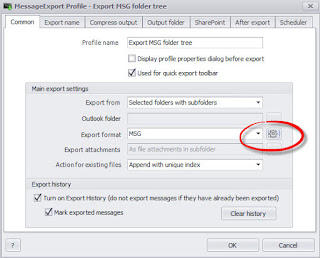 |
| Location of Msg email meta data setting. |
Here is the complete list of changes to this release of MessageExport for Outlook:
- ME-63: [ADD] Allow more than 50 characters per fields if less fields are being used in the naming schema
- ME-39: [ADD] Option to place email at end of pdf file. attachments appear in front.
- ME-71: [Fix] Error coming on OL 2010
- ME-72: [FIX] ME is disabled on OL 2013
- ME-67: [FIX] Error is coming when exporting PDF(Single file)
- ME-65: [FIX] Incoming message option skips emails when arriving simultaneosly
- ME-59: [FIX] Automatically suppress or accept saving signed emails.
- ME-70: [FIX] Conversion with Attachments converted/included ignores attachments
- ME-68: [FIX] attachment missing in resulted PDF when exporting rar file attachment as PDF attachment embedded
- ME-69: [FIX] Pop up for folder selection lost when minimized
- ME-54: [FIX] Exporting to MSG folder tree crashes the add in and Outlook
- ME-50: [FIX] Signed attachment converts to smime.p7m file
- ME-49: [FIX] Email removal when failed
- ME-29: [FIX] Populate metadata to export
- ME-60: [FIX] Export to MBOX files inaccurate count
MessageExport is an add-in developed by Encryptomatic LLC that helps users transform Outlook email in useful ways. MessageExport can save messages individually, in bulk or automatically, in may different ways, to many different formats, including PDF, MSG, EML, MBOX, CSV, JPG, and much more.
MessageExport is an add-in for Microsoft Office Outlook 2016, 2013, 2010 and 2007. Download a free trial of MessageExport at the developer's official product website.
This blog is maintained by Encryptomatic LLC, the developers of MessageExport.

