Showing posts with label email converter. Show all posts

08 March 2022

MessageExport Update Has Been Released (4.0.285)

MessageExport, the email export add-in for Microsoft Office Outlook, has been updated. We recommend that customers with a current software support subscription update to the latest release.

This release includes numerous improvements including:


ME-163 Add a numerical increment option that can be added to file names.


ME-161 Option to strip URLs from emails during email-to-text file conversion

ME-158 Suppress or automatically shorten the name of a file if it exceeds the limit

ME-136 Separate History and Marked options

ME-168 Updated System requirements

Several user reported bugs were prioritized and resolved in this release: 

ME-164 Unable to convert body text and certain images
ME-159 Metadata fields not imported to the preview
ME-153 Root element is missing. System.Xml
ME-165 Ability to print with remote images
ME-152 Broken feature: Attachments before body


About MessageExport Add-in for Outlook:

MessageExport is the premier tool for extending Outlook's capabilities to format, copy, name, and convert e-mail messages to PDF and other formats. MessageExport is used all over the world by thousands of large corporations, state and national governments and professional offices. MessageExport works with Windows versions of Microsoft Office Outlook to accomplish time consuming e-mail export tasks quickly. Operations requiring three or four steps to export, convert, name and copy e-mail messages can now be done in a single step with MessageExport

Visit the MessageExport home page at Encryptomatic.com/messageexport and download the 15 day free trial.

19 April 2021

PstViewer Pro 2021 version 9.0 is Released.

 PstViewer Pro 2021 has been released. This is a major update to our popular email viewer and converter.  With PstViewer Pro 2021 (version 9), major improvements have been made to the speed of exporting email to PDF documents.


PstViewer Pro 2021 main screen.


PstViewer Pro is an email viewer for opening Outlook .pst/.ost/.msg/winmail.dat email files, as wells .eml and .mbox email files.  PstViewer Pro can be used to search for email messages, and to export email messages either individually or in bulk to pdf, gif, tif, docx, csv, xls and many other formats.


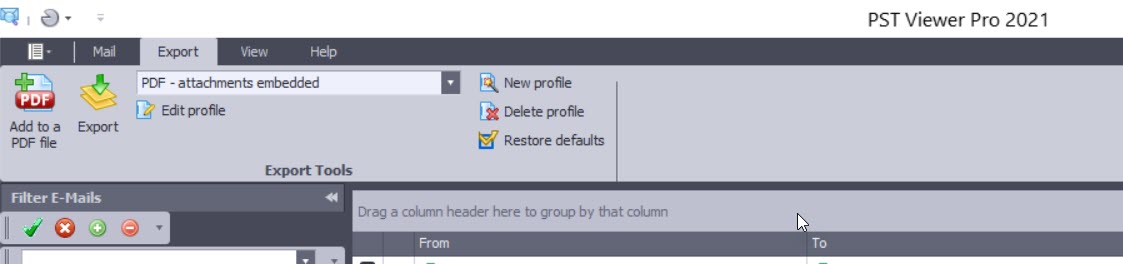
Screen image showing PstViewer Pro export menu.

A free trial of PstViewer Pro can be downloaded from the product home page.

For assistance in installing or uninstalling the software, contact Encryptomatic Support.

Improvements in PstViewer Pro 2021:

Software improvements and resolved issues in this major release are shown below. We have retained some of the issue numbers, in case you were tracking a specific issue.

- Single PDF export Imaged and Embedded restriction implemented with a warning if too many emails are embedded.

- Individual PDF export performance significantly improved

- ISO/A conversion performance has been enhanced

-  A issue in Mail Actions has been resolved. (PVP8-401)

- An issue with html links is resolved. (PVP8-408)

- Favorites tab has been enhanced (PVP8-403)

- Excel files convert in Single PDF exports is improved (PVP8-368/PVP8-378)

- UI issue for selected items is fixed (PVP8-399)

- Single Docx file restriction implemented to prevent performance issues.

- Single PDF conversion with MBOX is resolved. (PVP8-380) Restriction applies to this fix as well.

- Resolved issue where non-convertible attachments were sometimes not embedded on the output PDF (PVP8-396)

- UI Bug for the side pane (minor) PVP8-410

- Long build up time for Single Docx files (PVP8-414)

- Predefine/detect last email exported with the Single PDF restriction and move highlight to that email or auto batch convert the next 1000 emails from the last exported (PVP8-415)

- Adjust the profile naming schema for Folder tree PDF and copy (PVP8-412)