Showing posts with label OutDisk. Show all posts

05 February 2020

OutDisk SFTP 4.90.20 is released.


We have updated OutDisk secure FTP for Windows and OutDisk sftp add-in for Microsoft Office 
Outlook. Version 4.90.20 is now available for download from the OutDisk home page.

This is a minor release that resolves a few user reported issues around updating and activation reported.

OD-24 - Resolved OutDisk can not be activated
OD-25 - Revised current installer for a proper installation
OD-26 - Text: Remove Hosting URL from OutDisk Desktop app.
OutDisk Secure FTP is both a Windows desktop application and add-in for Microsoft Outlook. OutDisk lets you create a self-hosted service for uploading large files.  Because OutDisk SFTP is an application and not a service, users are responsible for providing their own hosting infrastructure. It is not recommended for people who are unfamiliar with web servers.
Secure FTP add-in for Outlook, screen shot.
OutDisk Secure FTP Add-in for Outlook
You can download a free 15 day trial of OutDisk secure FTP.

07 January 2020

Sending Large Email File Attachments from Microsoft Outlook with OutDisk SFTP Add-in

Businesses have long struggled with email file attachments.  Large file attachments in email are likely to bounce, failing to be delivered to the recipient. When they do arrive, they put a strain on server inbox resources.  Email file attachments also present a security risk from virus phishing attempts, causing email administrators to quarantine or strip the file from the email message.

There are plenty of 3rd party services who will provide email file attachment hosting for a fee.  Storing data outside of the organization and depending on the security protocol of the 3rd party provider is a great solution for some companies, but for those who use Microsoft Outlook and want more control of outbound email data, there is OutDisk SFTP.

OutDisk SFTP is an add-in that integrates with Microsoft Outlook 365/2019/2016/2013/2010. When an a sender attaches a file of any size to an email, OutDisk SFTP processes it without any additional requirement being placed on the sender.

In  seamless operation, OutDisk SFTP removes the attachment from the outbound email, uploads it over encrypted secure FTP to a company controlled server, and inserts a link and message into the email instructing the recipient to download the file.  Only the message and link are sent through email, while downloading the file occurs over secure TLS via https protocol.

OutDisk SFTP is free to try. If your organization needs an affordable and effective way to help your email users share files, while maintaining control on company servers,  try OutDisk SFTP.


OutDisk SFTP add-in installed in MS Outlook 365 menu system.
OutDisk can be manually activated, or automatically activated whenever an email file attachment is added to an email.

OutDisk SFTP Windows desktop application screen shot.
OutDisk also works from the Windows desktop. Outlook isn't required to use OutDisk SFTP.

Location of OutDisk SFTP Settings button and connection properties.
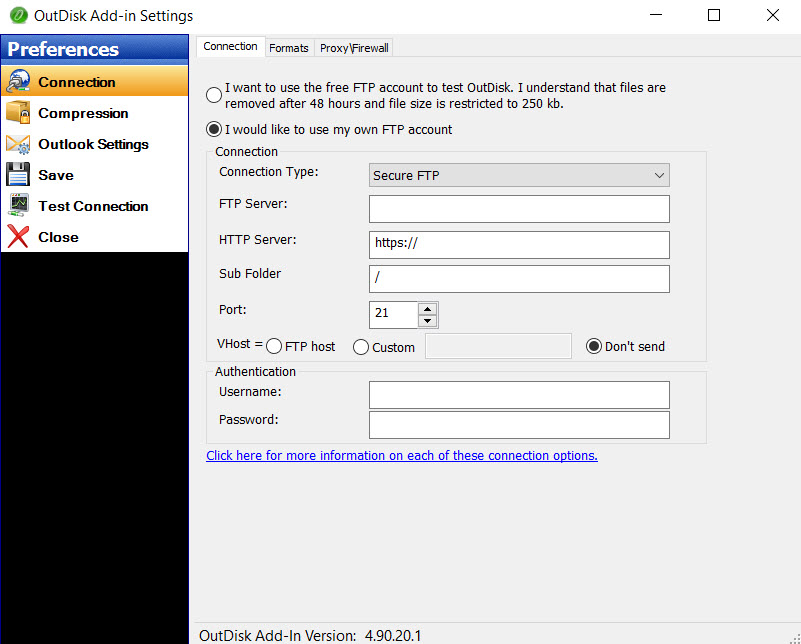
OutDisk SFTP Settings and connection properties.


Screen image showing how to change the default OutDisk SFTP message that is inserted into email.
The email default text inserted by OutDisk SFTP may be customized.

Screen image showing how to setup your SFTP server in OutDisk.
Configuring your SFTP server settings in OutDisk SFTP add-in.

Screen image shows a message log reporting "Test completed successfully."
Testing your SFTP connection.

Screen image shows the message and link that OutDisk SFTP has inserted into the email.
What recipients receive in their email inbox.

Image showing the settings for compressing Outlook email file attachments into a single zip file.
OutDisk SFTP supports file compression.

OutDisk SFTP default settings lets you control how OutDisk functions.
Default Settings in OutDisk SFTP


14 March 2019

OutDisk FTP Add-in for Microsoft Outlook has been Updated.

File Transfer Protocol, or #FTP, is a venerable old protocol with a legacy stretching as far back as 1971, when Abhay Bhushan wrote the spec for it.  With concerns slowly mounting about security over the years, FTP has given way to other file transport methods that securely handle passwords and encrypt transfers.

We originally released OutDisk FTP in 2006, and over the years it has not been one of our more successful products. The complexity of configuring FTP accounts and servers was a hurdle for some. Given the amount of time our support team spent troubleshooting our customer's person FTP servers, we learned firsthand that OutDisk is a niche tool that is not right for everyone. In fact, most people should use an file transfer add-in from a service like Dropbox, and not try to roll their own service.

Yet, our more hardcore OutDisk users (generally more technically capable with solid IT experience) have found ways to solve an array of problems with it, many of which we never envisioned.  At their urging we have updated OutDisk for Outlook 2019.  The emphasis of OutDisk moving forward will be on use of the SFTP Secure File Transport Protocol which adds encryption layer providing security far beyond old FTP.

If you are one of the persistent hardcore OutDisk users who wouldn't take "maybe" as answer, this update is for you.

What is OutDisk SFTP for Outlook?


It's been awhile, so we may as well start at the beginning.

OutDisk SFTP is a tool for transferring files from your Windows desktop to your remote server.  It can be used from the Windows desktop, but most people who choose OutDisk do so because of it's tight integration with the Microsoft Office Outlook interface.

When you send an Outlook email with file attachments, OutDisk SFTP Outlook add-in will, either automatically or by your manual selection,  remove the attachments from the email and upload them to your server. It then inserts your custom message and a https link into the email so the recipient can download the attachments.

The benefit of using OutDisk is that it makes your emails smaller and more likely to be delivered to the recipient's inbox.  You can also choose to automatically compress and encrypt the file attachments.

People who use OutDisk are generally in a small to mid-sized company, although we have had large electrical utilities use it.  What they all seem to have in common is a) they want to simplify sending attachments for their Outlook users, b) they don't want their users uploading company documents to their private Dropbox account or some other 3rd party file storage system, and c)  maybe they want to take some load off of email servers and storage, or have a legal need to keep control of documents, or have some kind of other specific use that had them searching Google for an FTP add-in for Outlook.

Here's some pictures of the OutDisk SFTP integration with Outlook.

How does OutDisk SFTP work from the user's perspective?

After setting up your SFTP server, and installing OutDisk SFTP with their log-in credentials, your users should find it simple to use.  They just create an Outlook email as they normally would, attach a file to the email and send it (as they normally would).

Here's an email with an EXE file attachment that I prepared to send to myself:

Outlook new email Message window.
Email with exe file attachment.See the OutDisk tool bar integration upper right corner.

Here's the normal message from Outlook reminding me that I can do that.


"This item contains attachments that are potentially unsafe."
Outlook warning about potentially unsafe file attachments.

And now, here's the email as it arrived in my Gmail Inbox.


Finally, here's the https webpage the recipient sees when they follow the link.  And yes, you can change the text that OutDisk inserts into the email. It's fully customizable.

image of OutDisk sftp landing page.
OutDisk SFTP download landing page

Yes, you can change the logo to your company logo.
We have provided a test SFTP service in OutDisk, just so you can try it right away.  File size is limited, and we sweep through and delete everything quite often, so please do not use it in production.

In Conclusion

We are very pleased that we can keep OutDisk compatible with the current versions of Microsoft Windows and Office.  If you think you might be a candidate to use Outdisk, or if it may be a fit for a project you're working on,  you can learn more and get the free trial at the OutDisk product home page.

By the way, those are my real email addresses. I love to hear from customers. Drop me a line and say hello.



23 December 2013

OutDisk FTP Add-On for Microsoft Outlook Updated to Version 4.51

We've released an update to OutDisk FTP. Version 4.51 is now available for download from the OutDisk web page. This release includes some general updates for Windows 8, Outlook 2013, and various bug fixes.

OutDisk is a tool for Microsoft Windows email users. It lets you send large files in email using the proven and reliable FTP protocol. OutDisk uploads large files to your web server; no need to depend on a 3rd party file service to host your files.

OutDisk includes an add-in for Microsoft Outlook. It can work with Exchange file size limitations to automatically upload attached files (or files that are too large to attach to the mail).  Administrators can use OutDisk to quickly build an in-house file sharing service, saving money on subscription based services while maintaining control over the files and server security.

Click here for more information about OutDisk FTP, or to download a 15 day free trial.

The OutDisk FTP toolbar as shown in Microsoft Office Outlook 2013.
OutDisk toolbar in Outlook 2013

Settings screen of the OutDisk FTP Microsoft Windows desktop application.
OutDisk desktop application

Image shows the OutDisk FTP addon settings page.
OutDisk FTP Outlook Add-on Settings


18 July 2013

OutDisk FTP for MS Outlook Is Updated

A maintenance release for OutDisk FTP for Microsoft Outlook has been released. Version 4.16.13 is now available and can be downloaded from the OutDisk FTP product page

This release improves OutDisk's compability with Outlook 2003, resolving some issues.  We've also added the ability to recall your compression settings if they have been changed in a session. Various small bug fixes have also been included in this release.

OutDisk FTP is an add-on for Microsoft Outlook. It connects Outlook to your web server by FTP, allowing you to upload files to your server for download by the email recipient.  OutDisk inserts a download link directly into the email, and removes the file attachment from the email.  System administrators use OutDisk to help users who need to circumvent files Exchange file size limits in email.

You can download a free 15 day trial of OutDisk FTP. It's compatible with Outlook 2003, 2007, 2010, and 2013, both 32 and 64 bit versions of Outlook.  More info at https://www.encryptomatic.com/outdisk

21 March 2012

OutDisk FTP for Outlook 4.5 is released

Encryptomatic LLC today announced the general availability of OutDisk FTP with Outlook add-in, version 4.5.

OutDisk is a Windows desktop application with an optional add-in for Microsoft Outlook. It lets users share email file attachments by uploading them to an FTP server. OutDisk is often used by system administrators to create an in-house file sharing solution for email users who are struggling to share large file attachments.

Click here for more information about OutDisk FTP and to download a free trial

30 March 2010

OutDisk FTP 3.0 is released

Encryptomatic LLC is pleased to announce the availability of OutDisk FTP version 3.0.
This version combines the previously separate OutDisk versions for Windows (version 2.1) and Outlook (version 1.5) into a single package.

OutDisk FTP will integrate with Windows XP/Vista/7 desktop to allow users to easily upload files to their FTP server. Outlook users can install the OutDisk add-in, as well as use the desktop integration.

New features include the ability to automatically use OutDisk if file attachments exceed a predetermined size threshhold.

OutDisk is used by individuals and businesses to make it easy to share large files through email. OutDisk works with your current FTP service or webhost. There are no monthly fees to use OutDisk.

More information and a free trial is available at http://www.encryptomatic.com/outdisk