Showing posts with label Outlook. Show all posts

10 March 2022

MailDex Email Manager Updated to Version 1.5.50

It has been a lot of work, and today we are happy to announce the availability of MailDex update 1.5.50.  In this update we set out to rewrite our mail indexing engine to improve speed and accuracy. Working with customers we were able to incorporate numerous suggested improvements and enhancements. 

MailDex lets you index many different email types and then search and convert them. We invite you to try MailDex free for 15 days.

For those who may have been tracking a specific issue, the changelog is provided below for transparency.


MailDex software box illustration showing 30 day money back guarantee. MailDex envelope logo and Encryptomatic LLC logo also are present.


Changelog MDX 1.5.50


Issue resolutions:
MDX-522 Search Display indicator issue resolved.
MDX-521 Search is improved
MDX-519 Commandline export error and fails to process, resolved.
MDX-514 Export Speed settings improved
MDX-513 End of Stream error when indexing EML files is fixed
MDX-512 Indexing process not displayed is fixed
MDX-510 Improved indexing of Powerpoint files
MDX-507 OST to EML conversion improvements
MDX-505 Improved indexing of pst/ost files from MS Outlook
MDX-448 Export emails to MBOX file is improved
Story
MDX-527 Some in house created files fail to read (resolved)
MDX-526 The method or operation is not implemented (resolveD)
MDX-503 Options to export visuals added.
MDX-317 Errors shown while indexing and enumeration is resolved
MDX-306 Extremely slow export related to Single PDF Attachments imaged, resolved.
Sub-taskMDX-517 SingleXML export fails for PST fileTask
MDX-528 Data error (cyclic redundancy check)
MDX-520 Delay on folder delete
MDX-515 Support .EMLX format (apple email files)
MDX-506 SingleXML export fails
MDX-502 Indexing is not triggered by the new version on existing files.


What is MailDex?

MailDex® by Encryptomatic® LLC is a Windows® software tool for indexing, searching, discovering and converting emails. MailDex works across many email client formats, including Outlook .pst, .ost, and .msg files, and Thunderbird's .eml, .mbox, as well as winmail.dat, and .mht files.

With MailDex, you can discover those few important emails hidden among millions. Use MailDex to organize, find, archive, and discover important email content

05 February 2020

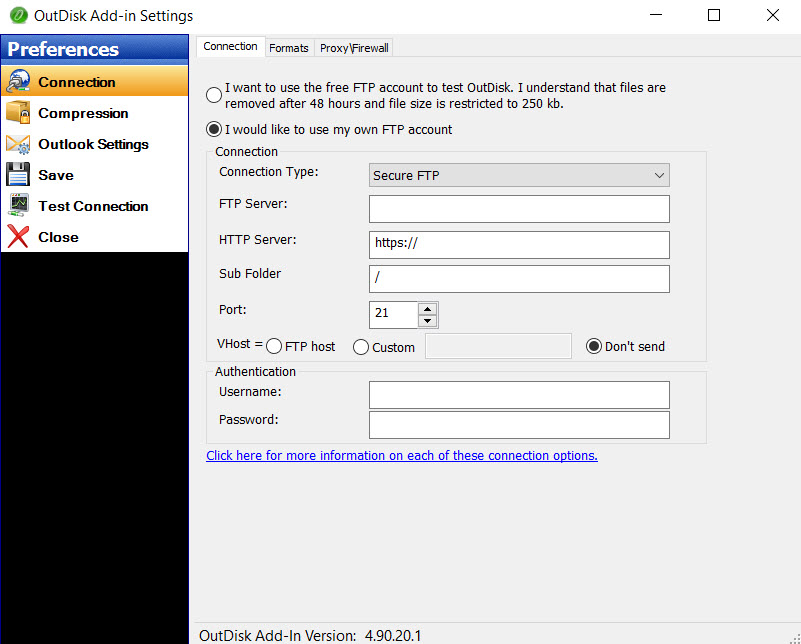
OutDisk SFTP 4.90.20 is released.


We have updated OutDisk secure FTP for Windows and OutDisk sftp add-in for Microsoft Office 
Outlook. Version 4.90.20 is now available for download from the OutDisk home page.

This is a minor release that resolves a few user reported issues around updating and activation reported.

OD-24 - Resolved OutDisk can not be activated
OD-25 - Revised current installer for a proper installation
OD-26 - Text: Remove Hosting URL from OutDisk Desktop app.
OutDisk Secure FTP is both a Windows desktop application and add-in for Microsoft Outlook. OutDisk lets you create a self-hosted service for uploading large files.  Because OutDisk SFTP is an application and not a service, users are responsible for providing their own hosting infrastructure. It is not recommended for people who are unfamiliar with web servers.
Secure FTP add-in for Outlook, screen shot.
OutDisk Secure FTP Add-in for Outlook
You can download a free 15 day trial of OutDisk secure FTP.

03 November 2017

MessageLock Development is Ending.

MessageLock is an email encryption add-in for Microsoft Outlook . It is the product that launched our company over a decade ago. So it's with some sadness that we announce that we have decided to stop development on MessageLock, and that we will be ending support after 2018.


If you are still using MessageLock, we encourage you to consider moving to the free Lockbin add-in for Outlook. Lockbin makes it easy to communicate securely with anyone.  You can get a free Lockbin account now and decide later if the additional premium services are worth a $4.95/mo subscription.


You can download the free Lockbin add-in for Outlook directly from https://lockbin.com


Why are we ending MessageLock development?
When it was launched 12 years ago, MessageLock made email encryption easier for thousands of Microsoft Outlook users.

Demand for MessageLock has not kept pace with other products that we offer, including an Outlook add-in for OpenPGP, Lockbin, and PDF Postman.  The frequency of Microsoft Office updates have made it impractical to continue supporting MessageLock, given the demand.


Will MessageLock stop working?
No, your copy of MessageLock will continue to work, but it will not be supported on upcoming versions of Microsoft Office Outlook


Is Lockbin.com the only option?
While Lockbin is a great option for communicating securely and has an excellent add-in for Outlook, at a customer's request, we will gladly transfer MessageLock licenses to our other products at no charge, including:

Encryptomatic OpenPGP add-in for Outlook:  www.encryptomatic.com/openpgp

PDF Postman add-in for Outlook: www.encryptomatic.com/pdfpostman

If you have you any questions or suggestions for how we can make your transition from MessageLock easier, please contact us.

07 September 2016

Why Did a Signed OpenPGP Email Fail a Signature Test at the Recipient's End?

One of our customers signed an email message with the Encryptomatic OpenPGP add-in for MS Outlook, but noticed that the recipient was unable to verify the message's digital signature, which was reported as invalid. They contacted our support team to report a bug.
On closer examination, our technician discovered that the message was being altered at the email server by MsgTag, a service that inserts web beacons into messages so that the sender knows it has been read.
This is essentially the sort of man-in-the-middle attacks that PGP signing a message is supposed to signal. If a message has been altered in transit, then a OpenPGP signed message will fail a signature test.
You can learn more about Web Beacons here.
If you are a user of #MsOutlook, download a copy of Encryptomatic OpenPGP and start protecting your email messages.

17 February 2016

MessageExport 4.07 maintenance release now available.

Encryptomatic LLC has released a maintenance update for MessageExport add-in for Microsoft Outlook. This update is an optional but recommended update that resolves some installation issues due to Microsoft's SmartScreen filter.  In 2016 Microsoft deprecated signing SHA1 code signing certificates, causing SmartScreen to issue a warning when installing software. This update incorporates a stronger Sha2 codesign certificate to placate Microsoft.

Shows MessageExport installed in Outlook toobar.
MessageExport for Outlook is updated for version 4.07

15 December 2015

Becoming an Email-to-PDF Conversion Jedi

When Stars Wars launched in 1977, relatively few people had ever heard of email, let alone received one. Even though other forms of messaging have largely overtaken email in our personal lives, business and customer communications often are sent by email because of it's open characteristics. The same openness that has allowed spam to become a huge problem for email administrators is also what makes it useful for communicating with customers and others who want to do business with our organizations.

At Encryptomatic LLC, we are focused on helping our customers manage their e-mail content. One of the important tasks that help people perform is converting email into different formats. In particular, PDF portable document format.  PDF is everywhere. It's used for storing, organizing and sharing email across platforms.

Our customers frequently find our products after spending days trying to cobble together an email-to-pdf conversion solution. While installing a PDF print driver sounds like a reasonable way to go, and is often cited as the first method that our customers try,  the problems of this method quickly become aparent.

PDF print drivers just can't handle complex email formatting, and they don't offer the functionality that quickly becomes an obvious need:
  • They don't provide custom file naming, forcing you to manually name the files
  • They can't handle email file attachments automatically
  • They can't export email in bulk
  • Bulk exported email can't be organized in subfolders
  • and so on...
Encryptomatic LLC offers products that push the traditional limitations on email conversion, addressing all of the aforementioned problems.  Ten years of listening to our customers and dealing with their issues have helped us to develop an uncommon set of products that help you get your email conversion work done accurately and quickly.

Email messages that can not be accurately read, printed or converted by competitor's products will probably render just fine in our software. If they don't, let us know and we will code a fix.  Over the years our developers have discovered and coded solutions into our products for hundreds of unique and uncommon format exceptions that exist in the wild.

Yes, there are published email specifications that if respected to by all developers would make life much easier for software developers.  The reality,  however is that there are many email clients and applications that produce poorly formatted email content.  Our email rendering engine, MVCOM is probably the most accurate and expansive product of its type ever developed.  MVCOM drives the rendering of email content in PstViewer Pro, and MsgViewer Lite, two of our email viewing products.

For Microsoft Windows Office Outlook users, MessageExport  vastly expands and simplifies converting Outlook email to PDF and many other formats.  It lets you automate routine email export tasks, and perform PDF conversion with uncommon simplicity and utility.

Screen image of MessageExport toolbar in Outlook 2016.
MessageExport add-in for Outlook.

We hope you'll take our products for a test drive. They are well worth the price. It will not take you very long to recover your investment in our products in time savings and productivity.  The average moderately-heavy MessageExport user recovers their investment in about one week.

Thanks for stopping by, and feel free to post any questions for us here. We love to hear from you.

01 September 2015

What is the Best Email Encryption Software For Microsoft Outlook? Four Add-ons Reviewed. (Part 2)

This is the second article in a two part series that examines the four email encryption add-ons developed for Microsoft Outlook by Encryptomatic LLC. I will assume you have absorbed the basic idea between symmetric and assymetric encryption schemes in part one.

Why does Encryptomatic LLC offer four different add-ons for encrypting Outlook email?  Why not just one? Each add-on has a sweet spot based mainly around processes.  It's no use sending a highly secure message to someone who will never be able to read it. Likelywise, if there is very little protection, then the message is probably best left unsent.

All of add-ons, if used responsibly, can provide a high degree of privacy for the message, especially against non-state actors. If you want to protect your message from people inside your company, your ISP, or Google, then any of our addons will suffice.  If you are trying to avoid NSA eavesdropping, then the best answer for you is OpenPGP.

Encryptomatic OpenPGP


Our new OpenPGP add-on for Microsoft Outlook will join our product lineup in late 2015. It is currently in beta. If you are interested in trying the beta, please email supportline at encryptomatic.com

We decided to create this product after listening to customers who were required to use OpenPGP to communicate with insurance companies.  They had no choice in the selection of the encryption method; they had to use OpenPGP, and they were struggling with the cost and complexity of installing it.

We also learned that some of the offerings available were simply not working very well in Outlook. They were difficult to use, and referenced outside applications for key management.  While Encryptomatic OpenPGP is still a work in progress, we believe that compared to other addons in the market, ours has the easiest setup and implementation process, a fair price (free for personal use) and a use process that is simple and unobtrusive.
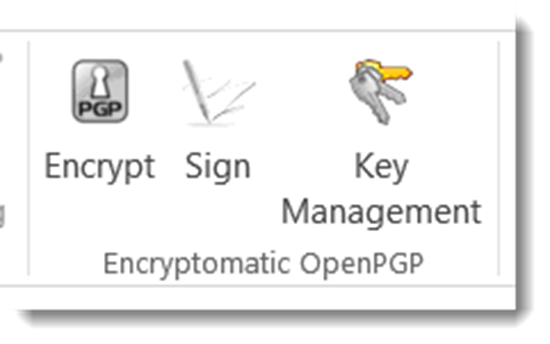
OpenPGP email encryption add-on for MS Outlook.
Encryptomatic OpenPGP addon toolbar installed in Microsoft Outlook
Encryptomatic OpenPGP provide the ability to encrypt, sign and manage keys, and is interoperable with other PGP software.  We recommend Encryptomatic OpenPGP wherever PGP is used, and when security and privacy trumps convenience.  As OpenPGP integrations with Microsoft Outlook go, we think you'll find our software to be the most useable available. If not, please let us know and we'll make it better.


Price: Encryptomatic OpenPGP is free for personal use.  Contact support at encryptomatic.com for business pricing.

Lockbin


Lockbin is a service for secure communication build around convenience, and the ability to send a message to anyone. It is typically used by doctors, lawyers, accountants, transcriptionist,  and other smaller office professionals who need an effective and practical way to communicate with  patients, clients and customers who are not sophisticated enough to implement OpenPGP.

Although Lockbin has a free add-in for Microsoft Outlook, the secure messages can also be retrieved by signing in to Lockbin.com,  on an Android app, or through the Lockbin Java application.

Screen shot showing the icons of the Lockbin toolbar in Outlook 2013.  The icons are titled: Settings, Receive Messages, and Send Request
Lockbin email encryption toolbar in Microsoft Outlook.
Lockbin uses public/private key encryption, but has simplified the process.  All messages on the Lockbin servers are encrypted at all times. No private keys are accessible on the servers, even to staff.

Lockbin gives you the ability to easily send secure messages to anyone. When you want to send a message to someone who is unknown to Lockbin, it will send an invitation to the recipient inviting them to a free account.  The signup process is free, immediate, simple, advertising free and non-invasive. 

Lockbin works best when both parties have a Lockbin account, but you can optionally send a password protected symmetric key encryption message to the recipient.

Price:
There is no charge for the Lockbin add-on for Microsoft Outlook.  Lockbin basic accounts are free. Premium accounts start at $4.95 per month for a single user, with discounts for multiple users.
Download the Lockbin addon for Outlook.

PDF Postman
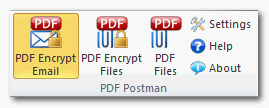
PDF Postman toolbar in Outlook 2013. Buttons read "PDF Encrypt Email," "PDF Encrypt Files," and "PDF Files."
PDF Postman encryption addon for Microsoft Outlook

PDF Postman is intended as a uni-directional communication process. That is, if you need to privately send a message and/or file to someone who cannot be bothered to sign up for anything or install special software, and a reply is not expected, then PDF Postman may be a good fit for you.

PDF Postman uses the common Portable Document Format, aka PDF files, to protect your messages.  AES-256 bit strong encryption is built into the PDF specification. Any spec compliant PDF reader such as Adobe Reader, can decrypt a PDF Postman message. This is useful because it means PDF Postman messages can be opened across any device platform: Windows, Linux, iOS, Android -- any device that has a compliant reader.

To open a PDF Postman encrypted PDF file, the recipient simply clicks on it. The encrypted PDF file is automatically loaded into the viewer, which recognizes that the file is encrypted and asks for a password.
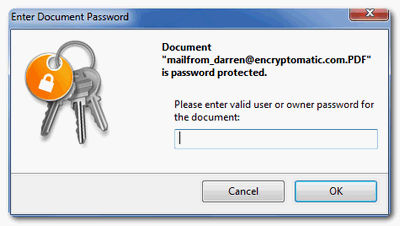
PDF Exchange viewer prompting "Please enter valid user or owner passwrod for the document."
PDF viewer prompting for a password.
 When the correct password is entered, the PDF message can be viewed.

Price:
PDF Postman is $69.99 for a single license and one year of updates and support.
Download a free trial of PDF Postman

MessageLock
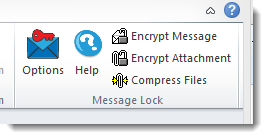
MessageLock toolbar. Text reads, Options, Help, Encrypt Message, Encrypt Attachments, Compress Files.
MessageLock toolbar in Microsoft Outlook

MessageLock is a simple and seamless end-to-end email encryption option for Microsoft Outlook. It is at its best when all users have Microsoft Outlook and MessageLock.

MessageLock can be sent to automatically encrypt messages to other MessageLock users. This is convenient and makes sending secure messages a essentially a background task that does not interrupt the sender or recipient.

MessageLock supports using different passwords for sending and receiving messages. Messages may be decrypted automatically when received and placed in the normal Outlook e-mail list.

If you will be regularly communicating with a small group of other Outlook users and end-to-end privacy is desired, then MessageLock may be right for you.

MessageLock also has an integration with Lockbin, so that you can send and receive messages through the Lockbin service. This makes MessageLock useful as both a end-to-end system, and as a "send to anyone" system.

Price
MessageLock is $49.99 for a single license and one year of updates and support.
A free 15 day trial is available to download.

Which Email Encryption Add-on Is Best?

If you are still unclear which of the four Outlook email encryption add-ons we discussed is best for you,  just try them!  All are available on a 15 day free trial.

If you have any questions, post them in the comments below, or email us our Sales team at sales at encryptomatic.com. You can also call us, 1-651-851-4902.

We are always willing to listen to your situation and recommend the best product to fit your specific situation.






18 February 2015

We can't stop making MessageExport better

When customers call us with great ideas, some times they're so good that we stop and get them into the software right away. While we just released version 3.5 of MessageExport a few weeks ago, we're happy to offer you an updated version 3.5.8 today.

A client called us and explained how we could make his job easier by expanding the functionality of MessageExport's file explorer. The explorer integrates to Outlook. It has been a convenient way for MessageExport users to convert individual e-Mails to PDF, or any of the other supported formats, simply by dragging the email from Outlook and dropping it onto the desired folder in the explorer.  MessageExport automatical converts the file to the selected format (formats are called "Export Profiles" and are selectable in MessageExport's drop down list).

What our customer wanted was a quick and easy way to use MessageExport's file explorer to preview files, and to select them for attaching to an e-Mail. With MessageExport's new explorer functionality, you can now accomplish a variety of additional tasks, such as exporting an email to PDF and then easily attaching it to an email message.

This short video demonstrates MessageExport's new file explorer integration with MS Outlook


Install and uninstall support is available from the Encryptomatic LLC support team.  Download the free 15 day trial of MessageExport and see if it can save you time.


20 January 2015

MessageExport 3.5 Released

MessageExport has been updated to version 3.5.  This version of MessageExport includes the new capablity to export embedded email attachments.  Now if you export an email message to PDF that has a .msg or .eml email attachment, MessageExport will process those embedded emails in a logical manner.

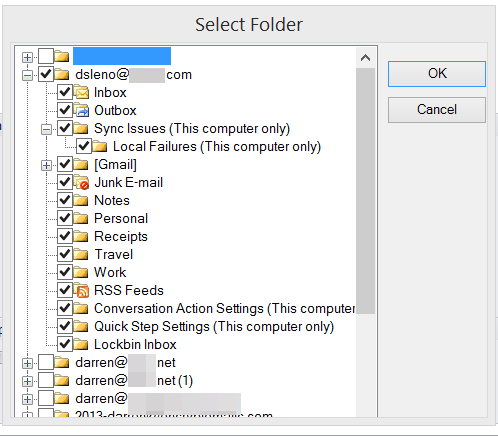
This release of MessageExport also includes the ability to select multiple folders for each export profile. 

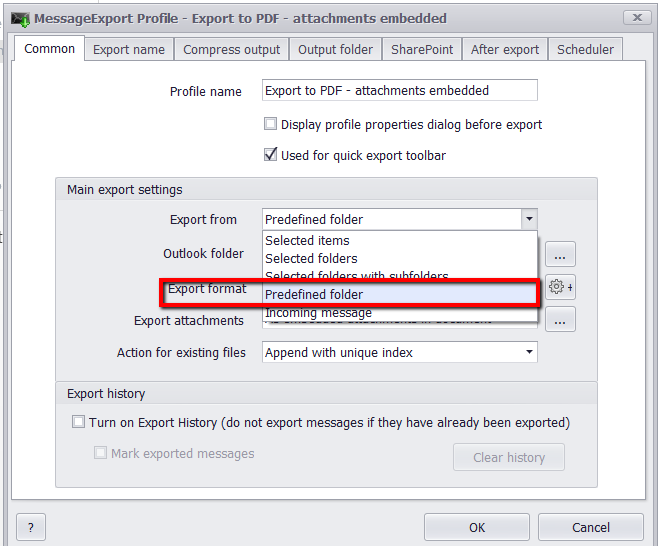
Existing users will understand that an export profile is a set of instructions that you can quickly execute against a set of email messages.  Using Export Format: Predefined Folders, you can now run an existing export profile against a group of selected folders, rather than only one specific folder. This greatly enhances the usefulness of export profiels.

To set this feature, edit an Export Profile, then go to the Common tab. Click "Export From" and choose "Predefined Folder."

Export Email From Predefined Outlook Folders

You can now indicate the folders that you want this profile to run against by placing a check in the box.
Select Outlook Folders.

Learn more about MessageExport and download a free trial from https://www.encryptomatic.com/MessageExport

09 September 2014

MessageExport maintenance release, 2.3.6.0, now available.

Hello All,

We have updated MessageExport 2.3.6.0. This is a maintenance release. It's optional, but we recommend it for all customers because of some fixes that were made to PDF search capabilities.


MessageExport Change Log:
================================================================================================
Version - 2.3.6
================================================================================================

- 0003834: [Add] "Browse for folder" dialog improvded
- 0003879: [Fix] Resolved an odd issue related to the PDF component used in MessageExport, wherein the word "Attachment" may not have been searchable in resulting PDF files. 
- 0003168: [Fix] Resolved another odd issue involving small font after exporting some "RE:" messages to PDF
- 0003413: [Fix] Improved exporting docx attachments, and resolved an issue relating to a specific docx attachment that a customer sent us. 
- 0003580: [Fix] Improved "Const '.'" in naming schema
- 0003431: [Fix] Header information may have been exported incorrectly. We fixed it.
- 0004039: [Fix] Some Windows XP users were seeing an Error message involving a .cab file. This is now resolved. 

MessageExport is an add-in that expands Outlook's ability to export email messages to PDF, MSG and many other formats.  People use MessageExport in creative ways to automate their work with email.

04 June 2014

PstViewer Pro email viewer is updated

PstViewer Pro has been updated! Version 6.0.0.294 is now available. It improves a number of functions around reply/forward/reply all operations, especially with .eml and Windows Exchange. 

You can download the update through your PstViewer Pro software.  A free 15 day trial can be downloaded from https://www.encryptomatic.com/pstviewer/download.html

Outlook email viewer, PStViewer Pro, is used for seaching emails in .pst, .msg, and .ost and .eml files.
Outlook email viewer, PstViewer Pro.
PstViewer Pro is an advanced email viewing tool for searching, printing, converting, replying and forwarding email content. It works with Outlook .pst, .ost, .msg and .eml email files.  Directories of .msg and .eml files can be displayed in an a mail list.  Double click on a message to obtain a full screen view.

PstViewer Pro can also bulk convert email content and most common file attachments to .pdf and other useful formats.


28 February 2014

MessageExport 2.3.3 update released


Today we have released an update to the MessageExport add-in for Microsoft Outlook. MessageExport makes it easy to export email messages from Outlook to different formats, automatically.   The latest update is version 2.3.3 and is available to customers with a product update and support program in place.

In this release we resolved an issue with diacritics, which may not have always been processed accurately in PDF files, and file names.

We have also improved the export folder tree naming operation. Long file names could cause problems during export operations if the length exceed Windows file system limitations. This improvement will catch such issues before they occur, preventing disruption of an export operation.

You can download this MessageExport update using this link: