Showing posts with label pst viewer. Show all posts

19 April 2021

PstViewer Pro 2021 version 9.0 is Released.

 PstViewer Pro 2021 has been released. This is a major update to our popular email viewer and converter.  With PstViewer Pro 2021 (version 9), major improvements have been made to the speed of exporting email to PDF documents.


PstViewer Pro 2021 main screen.


PstViewer Pro is an email viewer for opening Outlook .pst/.ost/.msg/winmail.dat email files, as wells .eml and .mbox email files.  PstViewer Pro can be used to search for email messages, and to export email messages either individually or in bulk to pdf, gif, tif, docx, csv, xls and many other formats.
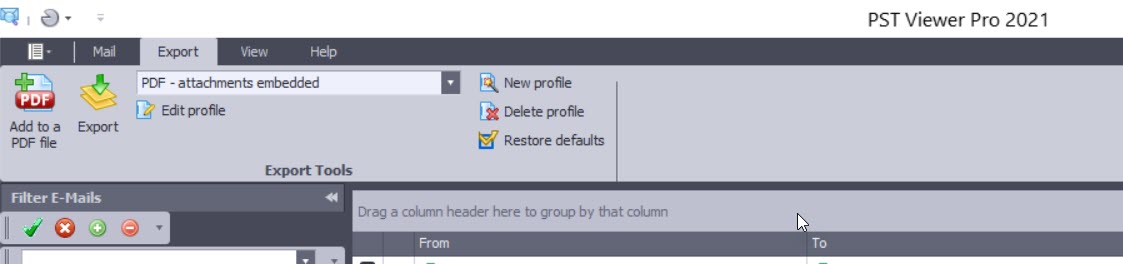

Screen image showing PstViewer Pro export menu.

A free trial of PstViewer Pro can be downloaded from the product home page.

For assistance in installing or uninstalling the software, contact Encryptomatic Support.

Improvements in PstViewer Pro 2021:

Software improvements and resolved issues in this major release are shown below. We have retained some of the issue numbers, in case you were tracking a specific issue.

- Single PDF export Imaged and Embedded restriction implemented with a warning if too many emails are embedded.

- Individual PDF export performance significantly improved

- ISO/A conversion performance has been enhanced

-  A issue in Mail Actions has been resolved. (PVP8-401)

- An issue with html links is resolved. (PVP8-408)

- Favorites tab has been enhanced (PVP8-403)

- Excel files convert in Single PDF exports is improved (PVP8-368/PVP8-378)

- UI issue for selected items is fixed (PVP8-399)

- Single Docx file restriction implemented to prevent performance issues.

- Single PDF conversion with MBOX is resolved. (PVP8-380) Restriction applies to this fix as well.

- Resolved issue where non-convertible attachments were sometimes not embedded on the output PDF (PVP8-396)

- UI Bug for the side pane (minor) PVP8-410

- Long build up time for Single Docx files (PVP8-414)

- Predefine/detect last email exported with the Single PDF restriction and move highlight to that email or auto batch convert the next 1000 emails from the last exported (PVP8-415)

- Adjust the profile naming schema for Folder tree PDF and copy (PVP8-412)

18 September 2019

Re-Introducing PstViewer Lite Outlook Email Viewer

https://www.encryptomatic.com/pstviewer/lite/


PstViewer Lite is the little brother of our PstViewer Pro email viewer.  At Encryptomatic LLC, we haven't paid much attention to PstViewer Lite lately. It's one of those rock solid products that performs well and hasn't demanded much attention from our support or development staff. That is about to change, however.


We are presently working to update PstViewer Lite to the most advanced version of our MVCOM email rendering engine.  This will keep PstViewer Lite performing well into the foreseeable future.  The impending update of PstViewer Lite seems like a good reason for us to re-introduce this workhorse Windows software product.


PstViewer Lite was first released a decade ago to fill a market need for a budget priced, well supported Microsoft Outlook email viewer.  You can associate PstViewer Lite with many different email file types, including .Msg, .Eml, .Mbox, .Pst, .Pst and even .MHT and .MHTML files.

Associations can be changed any time, but typically is set during the initial installation of PstViewer Lite.

Software screen shot showing selectable boxes for email file formats.
Associate PstViewer Lite with different email file types.

 PstViewer Lite is simple to use. Just locate the folder that holds the email file(s), and PstViewer Lite will read the individual mails into an organized list.  To preview an email in the viewing pane, just click on it.

View Outlook emails in the viewing pane of PstViewer Lite.
Click on an email to preview in the viewing pane.

To investigate the email message further, double click to open it in a full window.

Software screen shot of a html email in full window view, showing an image of a buffalo.
An HTML email rendered in a full window.
PstViewer Lite's important functions are quickly assessible from the main menu, including Reply, Forward, Print, Search and PDF

PstViewer Lite main menu

Email Search


PstViewer Lite has advanced search capabilities.  Use it to search a ost, pst or mbox file, as well as directories full of .msg and .eml emails.  Clicking on the search icon brings up a quick text search option. A more advanced search option is available to allow you to search for emails by mixing criteria such as sender, setting start and end calendar date for the search, searching specific email fields such as subject, sender, recipient and more.


Software screen shot showing searchable fields.
Email Advanced Search Function

Email to PDF 

PstViewer Lite can convert an email message to a PDF document.  This is the main difference between PstViewer Lite and Pro.  Where PstViewer Pro can export thousands of emails to PDF, PstViewer Lite will export individual selected emails to PDF.  The results are impressive.

To convert an email to PDF, first select an email from the PstViewer Lite email list. Next, click the PDF icon in the toolbar, and finally choose a place to save the PDF file.

Image of a PDF file created from a html .msg Outlook email with PstViewer Lite, showing a buffalo.
An email converted to PDF with PstViewer Lite

Thanks for taking a hard look at PstViewer Lite. You can download the free trial or purchase an affordable license on the product's software home page, www.encryptomatic.com/pstviewer/lite/
https://www.encryptomatic.com/pstviewer/lite/


Anyone purchasing the product today will receive the software update next month.  If you have any questions, please post them here or call us!  1-651-815-4902 x2.

07 May 2019

MailDex Update 1.3.4 is Released

Encryptomatic MailDex email archiving system has been updated.  The latest version 1.3.4 is now available for free trial on the MailDex website.  Customers with a valid MailDex maintenance and support service subscription can update from within the software Help tab.

Software screenshot showing location of Check for Updates in the Help tab.
MailDex Checking for Updates

A major improvement has been made to the advanced email search.  Users can now include AND/OR/NOT criteria and design "Sets" of search criteria.  Searches may be saved and reused at a later time.

Screen shot of MailDex advanced criteria in search.
Advanced Email Search in MailDex.
If you have been working with our support team on an issue, the following tracked issues have been resolved in this release.

Features:
MDX-217    AND/OR Searches improvements

Fixes:
MDX-194    Regex "And" search
MDX-224    Update folders and icons names to MailDex 2019
MDX-227    RegEx search improvement
MDX-231    MDX 1.3.1: Add group may cause crash in some instances
MDX-232    MDX 1.3.1: Clicking on search icon may cause issue in some instances
MDX-233    MDX 1.3.1: Save-as improvement
MDX-234    MDX 1.3.1: Control may appear out of frame
MDX-236    Save throws unhandled exception in some instances
MDX-239    Require activation over TLS only.
MDX-242    Update links for Connect with us
MDX-243    Remove favorites feature

For support or upgrade questions, please feel free to contact us.

27 March 2018

Introducing MailDex Email Management System

Very are pleased today to announce the latest product from Encryptomatic LLC.

MailDex 2018 is a powerful email archiving/conversion system. Whether managing thousands or millions email messages, MailDex will let you find that important 'needle in a haystack' email.

MailDex logo.
MailDex for email archiving, conversion and search.
Try MailDex free for 15 days!

MailDex™ by Encryptomatic® LLC is a Windows software tool for indexing, discovering and converting emails. MailDex works across many different email formats, including Outlook .pst, .ost, and .msg files, and .eml, .mbox, winmail.dat, and .mht files.

MailDex is project driven, so for example, a law firm performing discovery on multiple cases can establish two different projects, preventing the content from mingling, Create an unlimited number of projects. Each project can index an unlimited number of emails. 

Search across one project, or search all of your projects. Email files within a project, or an entire project may be removed from your MailDex index at any time.

Learn more and get a free trail at https://www.encryptomatic.com/maildex/

25 February 2016

MBOX File Support Added to PstViewer Pro Version 8.0

Today we are releasing an update for PstViewer Pro. Version 8.0 is now available for download. This is a recommended update for all eligible customers.

Image of PstViewer Pro with MBOX selected.
PstViewer Pro now supports viewing/converting MBOX files.

PstViewer Pro now includes support for viewing searching and converting emails stored in ‪#‎MBOX‬ files. Mbox files contain multiple ‪#‎email‬ messages and their file attachments.  Mbox files are created by many different email clients, including the popular Mozilla Thunderbird client.

This capability is included in the latest PstViewer Pro download (v8) and is available to all customers who purchased EmlViewer Pro in the past year, or who have an updated support/maintenance plan. Contact supportline at encryptomatic.com with any questions!

13 June 2013

PstViewer Pro 5 Now Available

Encryptomatic LLC today released PstViewer Pro 5.0, a major update of it's market leading Outlook .pst email viewer.  PstViewer Pro 5 includes important new customer requested features, such as searching across multiple Outlook .pst files.

PstViewer Pro logo

PstViewer Pro is the premier tool for people who have important work to do with email.  With Pst Viewer Pro, you can open Outlook .pst, .ost, .mht., .eml, .msg and winmail.dat email files, search for emails, and export them to different formats including .pdf, mbox, mht, eml, csv, and other formats.

Click here for more information on PstViewer Pro, or to download a free trial.

PstViewer Pro Change Log:
====================================================================================
Version - 5.0.0
====================================================================================

- Compatible with Gmail EML files (skipping initial new line and whitespace symbols)
- Improved transport header parsing
- MIME 1.0 parser fixed according to RFC 2047
- Support for multiline attachment filenames
- Improved non-standard "Date" decoding
- Improved non-standard recipients list decoding
- Fixed: application hangs on opening a specific EML message
- Fixed: In specialized instances, Jpg attachments in specific EML message body was not displayed
- Search in multiple PST/OST files
- More responsive GUI
- Assigning a default name for unnamed attachments as "Attachment-N"
- Improved working with network paths
- Changed default action on empty exported file name (do not stop on long export)
- EML reader enhancements and improvements to addressed specialized problems with non-standard formatted emails:

- [Fix] Error message on some MHT file parsing
- [Fix] System.IO.__Error.WinIOError
- [Fix] System.ArgumentException: Font 'Arial Unicode MS' does not support style 'Regular'
- [Fix] Some PDF embedded attachments were not accessible with Adobe Reader. Resolved.
- [Fix] Added additional exceptions to MSG reader, resolving intermittent issue where body was not available in certain specialized instances
- Added Compatibility with local FIPS encryption group policy

08 February 2013

Pst Viewer Pro 4.8 Update Available

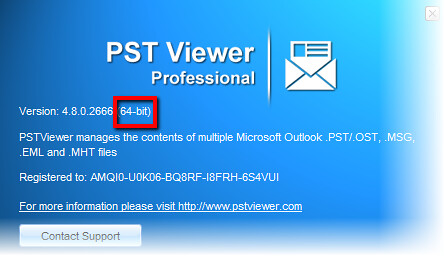
We have released an update to Pst Viewer Pro. We recommend this update to all customers. With version 4.8, Pst Viewer Pro is now a native 64-bit application when installed on a 64-bit Windows operating system, allowing it to access more RAM memory and improving speed.

Download the update here.

Pst Viewer Pro is now a 64-bit app for searching and exporting Outlook email messages.


Enhancements
- 64 bit PST Viewer Pro version installs automatically
- Easy selection for all messages in the list, "Select all" context menu item has been added
- "Connect with us" menu item
- New association icons
- Improved EML decoding
- Improved message enumeration indicator in the status bar

Issues Resolved:
- Fixed incorrect shortcut icons in the folder tree
- Removed VML artifacts from HTML message body (MSG, PST, OST files)
- Resolved subject cutting in Japanese for some EML files
- Fixed very small font size in PDF export
- Fix for error 'System.IO.FileNotFoundException: Could not find file DockLayouts.xml'
- Fix for error 'System.OutOfMemoryException' when reading messages
- MHT file icon is missing for 64-bit system
- Improved export to MBOX format, removed odd new line symbols
- Corrected exporting MSG file with MSG attachment to EML format with "noname" file attachments.

31 August 2012

Pst Viewer Pro 4.7 released


Encryptomatic LLC today released Pst Viewer Pro 4.7. This release includes several new features, an important UI change, and is recommended for all users with current product update and support plans. Please download the update through the software by going to Help>Check for Updates, or download from the Pst Viewer Pro home page.

This release includes an improvement to the Pst Viewer Pro user interface. We have brought forward important export functionality to the main toolbar to help you work more efficiently  with fewer keystrokes.  To export selected email to PDF, simply select the the PDF export profile from the drop down list, and then click the Export button (the export button is the icon with the green down arrow and gold paper). You can also edit, create and delete export profiles directly from the main toolbar.

Pst Viewer Pro - open pst files from main menu and export to PDF
Pst Viewer Pro menu brings forward export functions

Change log for Pst Viewer Pro 4.7

[Add] Single PDF (exporting batch messages to single pdf file)
[Add] Export to PDF/A (ISO 19005-1)
[Add] Convert XLS & PPT attachments to PDF
[Add] Added new export profiles for PDF (names start with “Single” and PDF/A)
[Add] Add to a PDF file feature
[Add] Upgrades for command line export function, --outputdir
[Add] Ukrainian language translation added
[Fix] Enhanced Html script errors suppression based on IE popup javascript error message
[Fix] Improved PDF Text search ability
[Tweak] Export, new default naming scheme for all profiles – As Subject

Pst Viewer Pro is the premier tool for viewing Outlook .pst, .ost, .msg, .eml and .mht files. Pst Viewer Pro lets users search pst files, view email messages, extract file attachments, and convert emails in a PST to PDF. It can also convert MSG and EML files to PDF and other formats. A 15 day free trial of PST Viewer Pro can be downloaded from the Pst Viewer Pro home page.

21 December 2011

PstViewer Pro Update Released


A maintenance update for PstViewer Pro (4.5.4.2288) has been released.  Prospective customers can download the full trial version here.

PstViewer Pro is the premier windows software tool for accessing Outlook PST files, MSG, EML and Winmail.dat files. PstViewer Pro lets users view, search, reply, forward, print, name and convert their email messages.

PstViewer Pro Version 4.5.4.228 Change Log:
================================================================================================
Version - 4.5.4
========================================
- 0001534: [Add] Add "Reply All" button
- 0002530: [Add] Search. Searches for whole words (as opposed to strings which can be substrings) - 0002573: [Add] Search. Ability to execute search by 'or' parameter
- 0002574: [Add] Ability to search for more than one sender at a time
- 0002572: [Fix] Body is not fully displayed (nor exported to PDF) for specially formatted .pst attachments
- 0002552: [Fix] Crash while searching. 'Value cannot be null. Parameter name: input' while searching
- 0001959: [Internal]  "Attempt to read or write protected memory. This is often an indication that other memory is corrupt" message which may appear during some search actions

For more information on PST Viewer Pro, visit the product page.

28 March 2011

PstViewer Pro 4.5 Update is Released

PstViewer Pro version 4.5.1.1433 is now released to general availability. Kudos to Alex and Viktoriya!

PstViewer Pro is a viewer for email messages stored in .eml, .msg, .ost and .pst formats. With PstViewer Pro, users can view email messages in text, html or rich text format, reply to messages using their default email client, search emails, and export emails to different formats, including PDF.

PstViewer Pro contains numerous improvements to its functionality and stability.

Prospective customers can click here for more information on Pst Viewer Pro and to download a free trial.

Existing customers with current product update plan can check their "Update Software" settings to download PstViewer 4.5. Enterprise customers should contact the sales team for the PstViewer Pro enterprise upgrade.
Support for PstViewer Pro is available online at https://www.encryptomatic.com/support/

17 November 2010

Beware of MsgViewer Pro Crack and Serial Gen downloads from Warez sites

Recently we learned of a supposed  "cracks" for some of our products, including Pst Viewer Pro, and MsgViewer Pro,   appearing on warez download websites.  Beware of these cracks!   They do not work, and we have confirmed that they are virus infected.

I know that's what you might expect a software publisher to say, but it is certainly true and we want to warn you. This happens to tens of thousand of software publishers each year. Criminals know that some people are looking for illegally "cracked" software, and they use this knowledge to infect computers with viruses and keyboard monitors.

Download a Free Trial of Pst Viewer Pro Direct from the Publisher.

Our team download and tested the purportedly cracked software (which actually is not MsgViewer Pro or Pst Viewer Pro), and found Trojan.Win32.Generic.pak!cobra, which is one of the most popular viruses in 2010, according to GFI. It infects both 32- and 64-bit Windows versions stealing the user's personal data.  Other viruses our team found were Trojan.Generic.KD.67255, and Trojan.DownLoad2.18121.

We are of course very upset that our software would be used as bait to infect a potential customer's computer, even though that user sought out illegal copies of our software.

We have sent notices to hosting sites to demand they remove the software. Because these Warez sites pop up as quickly as they are shut down, it is very difficult to make progress. So now we focus our efforts on warning you directly.

How does this happen? It seems that these criminals will acquire a list of software products, then autogenerate thousands of web pages based on the list,  hijacking  trademarks, intending for them to be indexed in search engines. People searching for links to cracked software or free license keys are at risk of being lured.  When they visit the warez website, they may be asked to pay $2 or some other small amount for the software, potentially handing their credit card information directly to the criminals.

When the user downloads and runs the software (which isn't actually MsgViewer Pro or Pst Viewer Pro at all),  nothing will appear to happen. At that point, the computer is infected.

We wanted to bring this to your attention because, a) we are disturbed that this is happening, b) we don't want anyone to be infected by a fake crack of our software (even if they are trying to steal our work), and c) we want to let you know that we have taken precautions to ensure that our website and CNET Download.com and Snapfiles.com are the only websites were  we directly monitor download our downloads.

If the search engines do their duty, hopefully this blog post will rise to the top of the "MsgViewer Pro crack" and "PST Viewer Crack" and "Encryptomatic Crack" search  results and others may be warned. 

22 July 2010

PstViewer Pro 4.1 maintenance update released

Encryptomatic LLC announced today the general release of PstViewer Pro 4.1.  PstViewer Pro is a Windows application for viewing, copying, converting, and managing Outlook PST files.

Version 4.1 improves PST read speed, and resolves issues reported by users. The upgrade is available to all current PstViewer Pro users through the automatic upgrade function.

People who have previously tried PstViewer and who would like to extend their software trial may do so by entering the following key into PstViewer Pro.

E079F-C6070-8BFA0-133AE-F7B0C-52000-00064-00000-00000E

A trial of PstViewer Pro may be downloaded from this link.

PstViewer Pro is used by individuals, corporations and governmetns to manage PST files without the need for Outlook or MAPI.  PstViewer Pro has many advanced features, such as search, export to PDF with attachmented embedded, export to other formats, batch printing, multiple-PST management, and more.  PstViewer Pro can render even very complex Outlook rich text messages, including those containing embedded graphics, internet hosted objects, charts, SmartArt, and more. 

For more information PstViewer Pro visit http://encryptomatic.com/pstviewer/pstviewer.html