
MessageExport has been updated to version 3.5. This version of MessageExport includes the new capablity to export embedded email attachments. Now if you export an email message to PDF that has a .msg or .eml email attachment, MessageExport will process those embedded emails in a logical manner.
This release of MessageExport also includes the ability to select multiple folders for each export profile.
Existing users will understand that an export profile is a set of instructions that you can quickly execute against a set of email messages. Using Export Format: Predefined Folders, you can now run an existing export profile against a group of selected folders, rather than only one specific folder. This greatly enhances the usefulness of export profiels.
To set this feature, edit an Export Profile, then go to the Common tab. Click "Export From" and choose "Predefined Folder."
You can now indicate the folders that you want this profile to run against by placing a check in the box.
Learn more about MessageExport and download a free trial from https://www.encryptomatic.com/MessageExport
This release of MessageExport also includes the ability to select multiple folders for each export profile.
Existing users will understand that an export profile is a set of instructions that you can quickly execute against a set of email messages. Using Export Format: Predefined Folders, you can now run an existing export profile against a group of selected folders, rather than only one specific folder. This greatly enhances the usefulness of export profiels.
To set this feature, edit an Export Profile, then go to the Common tab. Click "Export From" and choose "Predefined Folder."
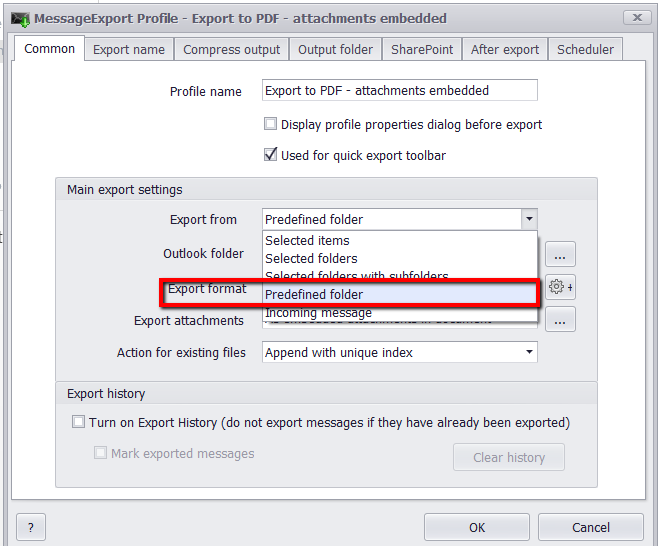 |
| Export Email From Predefined Outlook Folders |
You can now indicate the folders that you want this profile to run against by placing a check in the box.
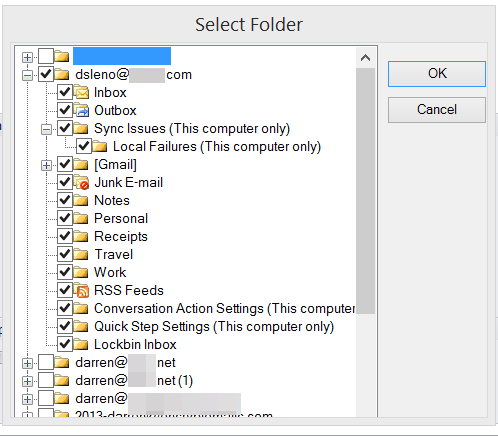 |
| Select Outlook Folders. |
Learn more about MessageExport and download a free trial from https://www.encryptomatic.com/MessageExport

