26 March 2020

Working at Home?

We won't spend too much time here recapping current events.  You know what's going on.  And you're probably working from home right now as you read this.

Encryptomatic LLC has been a digital company from the moment of its founding in 2005.  100% of our employees and contractors are able to work remotely. Its a way of working to which we are fully accustomed.  It has been a bit of a surprise to us just how much of the world is finally getting around to working online.

Since last week, things have slowed a bit for us, so if you have any questions about working online, or about how we work, or the tools we use, or whatever... feel free to connect with us.  We enjoy hearing from people like you, and are always glad to help in any way we  can. 

We are a small company. We are real people.  If we can do anything for you right now, we will be glad to try to help.


07 February 2020

MailDex 2020 is Updated


We have updated MailDex 2020 (v1.5) email manager and exporter.

This update resolves several issues discovered by our QA team.  It also includes a new feature, export email to XML.


Screen image showing location of email to xml export in MailDex.
Export Email to XML with MailDex
A screen shot of a xml file containing email content.
Email that has been converted to XML


Export to CSV has also been improved. Additional email data fields are now included during CSV export operations.

The full list of changes to MailDex 2020 include:
Feature: MDX-222    XML Export format added for data collection, CSV fields expanded


MDX-220    Margins not centered on output PDF
MDX-366    Export to CSV fails silently when overwriting file in use
MDX-367    CSV file may be malformed if there are multiple file attachments in a .msg file
MDX-368    Some email file attachment names may not be not exported to CSV
MDX-372    File may fail to convert during Single PDF export operation.

How to update MailDex

You can update MailDex from within the software by going to Help > Check for Updates.

Screen shot showing location of MailDex "Check for Updates".
Check for Updates


Alternatively, you can download the free trial and install it on your computer. The installer will detect if you have a licensed copy of MailDex, and will install the updates.


Screen image of MailDex, "Completing the MailDex 2020 Setup Wizard"e
Update MailDex 2020

05 February 2020

OutDisk SFTP 4.90.20 is released.


We have updated OutDisk secure FTP for Windows and OutDisk sftp add-in for Microsoft Office 
Outlook. Version 4.90.20 is now available for download from the OutDisk home page.

This is a minor release that resolves a few user reported issues around updating and activation reported.

OD-24 - Resolved OutDisk can not be activated
OD-25 - Revised current installer for a proper installation
OD-26 - Text: Remove Hosting URL from OutDisk Desktop app.
OutDisk Secure FTP is both a Windows desktop application and add-in for Microsoft Outlook. OutDisk lets you create a self-hosted service for uploading large files.  Because OutDisk SFTP is an application and not a service, users are responsible for providing their own hosting infrastructure. It is not recommended for people who are unfamiliar with web servers.
Secure FTP add-in for Outlook, screen shot.
OutDisk Secure FTP Add-in for Outlook
You can download a free 15 day trial of OutDisk secure FTP.

07 January 2020

Sending Large Email File Attachments from Microsoft Outlook with OutDisk SFTP Add-in

Businesses have long struggled with email file attachments.  Large file attachments in email are likely to bounce, failing to be delivered to the recipient. When they do arrive, they put a strain on server inbox resources.  Email file attachments also present a security risk from virus phishing attempts, causing email administrators to quarantine or strip the file from the email message.

There are plenty of 3rd party services who will provide email file attachment hosting for a fee.  Storing data outside of the organization and depending on the security protocol of the 3rd party provider is a great solution for some companies, but for those who use Microsoft Outlook and want more control of outbound email data, there is OutDisk SFTP.

OutDisk SFTP is an add-in that integrates with Microsoft Outlook 365/2019/2016/2013/2010. When an a sender attaches a file of any size to an email, OutDisk SFTP processes it without any additional requirement being placed on the sender.

In  seamless operation, OutDisk SFTP removes the attachment from the outbound email, uploads it over encrypted secure FTP to a company controlled server, and inserts a link and message into the email instructing the recipient to download the file.  Only the message and link are sent through email, while downloading the file occurs over secure TLS via https protocol.

OutDisk SFTP is free to try. If your organization needs an affordable and effective way to help your email users share files, while maintaining control on company servers,  try OutDisk SFTP.


OutDisk SFTP add-in installed in MS Outlook 365 menu system.
OutDisk can be manually activated, or automatically activated whenever an email file attachment is added to an email.

OutDisk SFTP Windows desktop application screen shot.
OutDisk also works from the Windows desktop. Outlook isn't required to use OutDisk SFTP.

Location of OutDisk SFTP Settings button and connection properties.
OutDisk SFTP Settings and connection properties.


Screen image showing how to change the default OutDisk SFTP message that is inserted into email.
The email default text inserted by OutDisk SFTP may be customized.

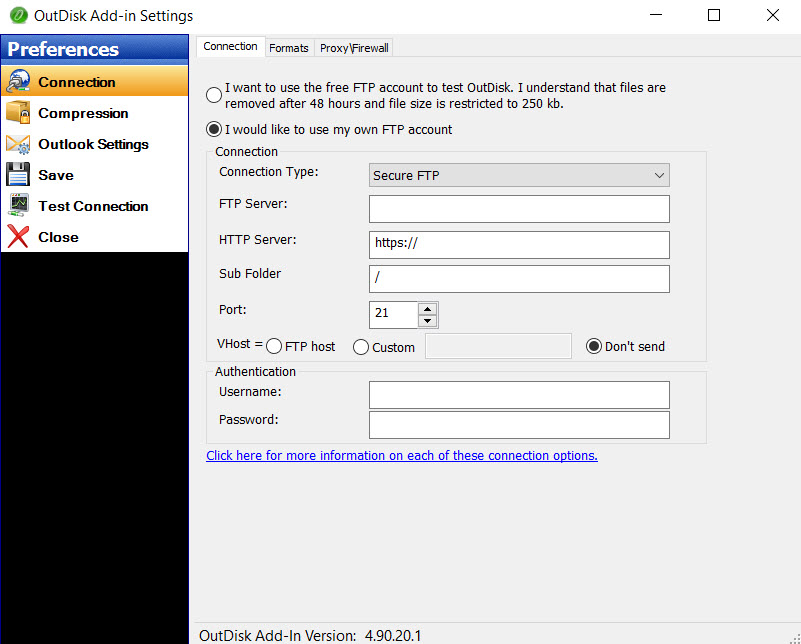
Screen image showing how to setup your SFTP server in OutDisk.
Configuring your SFTP server settings in OutDisk SFTP add-in.

Screen image shows a message log reporting "Test completed successfully."
Testing your SFTP connection.

Screen image shows the message and link that OutDisk SFTP has inserted into the email.
What recipients receive in their email inbox.

Image showing the settings for compressing Outlook email file attachments into a single zip file.
OutDisk SFTP supports file compression.

OutDisk SFTP default settings lets you control how OutDisk functions.
Default Settings in OutDisk SFTP


05 December 2019

An update for MailDex 2020 email manager is now available.

Encryptomatic LLC has released an update to their MailDex 2020 email management and conversion software.  Version 1.4.6 is an update that is recommended  for all customers. It solves several user reported issues and includes the latest performance and user interface improvements.

This update is available to all customers with a current MailDex support and update contract.   To update within MailDex, go to Help > Update Software.

The issues resolved include:
MDX228 & MDX119: The message count was incorrect for MBOX formatted emails
MDX346: A crash may occur when a certain column is maximized
MDX347: Index process sometimes became unresponsive with MBOX
MDX348: Improved single PDF conversion performance for MBOX files
MDX349: Now handles corrupted attachment names for MBOX files
MDX345: Advanced Search was relocated for improved ease of use

Screen image showing the location of email Advanced Search in MailDex software.
Location of Email Advanced Search

MailDex by Encryptomatic LLC is an advanced Windows software tool for indexing, searching and converting multiple email formats.  Use MailDex to create a searchable index of millions of email messages.  MailDex supports Outlook pst, ost, msg, as well as mht, mbox, and eml email files.

Get a free 15 day trial of MailDex on the official MailDex product home page.


06 November 2019

Encryptomatic OpenPGP for Outlook is Updated

Encryptomatic OpenPGP add-in for Microsoft Outlook has been updated. The latest version is 2.6.5 and is now available for download.

This release resolves several user reported issues and is recommended for all users.

The numerous enhancements in this release include:
  • Improve message wording for unsigned messages.
  • Added an option to decrypt attachments only.
  • Improvements to text formatting.
  • Allow extending a key's validity.
  • Fixed an issue with opening signed inline messages.
  • Resolved issue where auto conversion from html body to plain text body adds extra spaces to the message text.
  • Improved decryption trigger for non encrypted emails.
  • Resolved  an issue where selecting today's date as expiration date when creating key produces wrong expiration date (+>100 years).
  • Fixed problem where Add in can not open signed multipart message.
  • Resolved issue where Detail box after decryption does not open if something failed or if message is un-signed.
  • Resolved issue where key creation and expiration time are not UTC https://tools.ietf.org/html/rfc4880#section-3.5
  • Fixed an issue where signature verification may fail when it should be successful.

Encryptomatic OpenPGP is an add-in for Microsoft Outlook 2010, 2013, 2016, 2019/365 that brings OpenPGP email encryption to the Outlook toolbar. It is used by companies and individuals to send end-to-end public key encrypted email messages from Outlook,

Learn more about Encryptomatic OpenPGP at our website, and download the software.  Encryptomatic OpenPGP is free for personal, journalism, activist and non-profit uses, and very affordable for business/government uses.

18 September 2019

Re-Introducing PstViewer Lite Outlook Email Viewer

https://www.encryptomatic.com/pstviewer/lite/


PstViewer Lite is the little brother of our PstViewer Pro email viewer.  At Encryptomatic LLC, we haven't paid much attention to PstViewer Lite lately. It's one of those rock solid products that performs well and hasn't demanded much attention from our support or development staff. That is about to change, however.


We are presently working to update PstViewer Lite to the most advanced version of our MVCOM email rendering engine.  This will keep PstViewer Lite performing well into the foreseeable future.  The impending update of PstViewer Lite seems like a good reason for us to re-introduce this workhorse Windows software product.


PstViewer Lite was first released a decade ago to fill a market need for a budget priced, well supported Microsoft Outlook email viewer.  You can associate PstViewer Lite with many different email file types, including .Msg, .Eml, .Mbox, .Pst, .Pst and even .MHT and .MHTML files.

Associations can be changed any time, but typically is set during the initial installation of PstViewer Lite.

Software screen shot showing selectable boxes for email file formats.
Associate PstViewer Lite with different email file types.

 PstViewer Lite is simple to use. Just locate the folder that holds the email file(s), and PstViewer Lite will read the individual mails into an organized list.  To preview an email in the viewing pane, just click on it.

View Outlook emails in the viewing pane of PstViewer Lite.
Click on an email to preview in the viewing pane.

To investigate the email message further, double click to open it in a full window.

Software screen shot of a html email in full window view, showing an image of a buffalo.
An HTML email rendered in a full window.
PstViewer Lite's important functions are quickly assessible from the main menu, including Reply, Forward, Print, Search and PDF

PstViewer Lite main menu

Email Search


PstViewer Lite has advanced search capabilities.  Use it to search a ost, pst or mbox file, as well as directories full of .msg and .eml emails.  Clicking on the search icon brings up a quick text search option. A more advanced search option is available to allow you to search for emails by mixing criteria such as sender, setting start and end calendar date for the search, searching specific email fields such as subject, sender, recipient and more.


Software screen shot showing searchable fields.
Email Advanced Search Function

Email to PDF 

PstViewer Lite can convert an email message to a PDF document.  This is the main difference between PstViewer Lite and Pro.  Where PstViewer Pro can export thousands of emails to PDF, PstViewer Lite will export individual selected emails to PDF.  The results are impressive.

To convert an email to PDF, first select an email from the PstViewer Lite email list. Next, click the PDF icon in the toolbar, and finally choose a place to save the PDF file.

Image of a PDF file created from a html .msg Outlook email with PstViewer Lite, showing a buffalo.
An email converted to PDF with PstViewer Lite

Thanks for taking a hard look at PstViewer Lite. You can download the free trial or purchase an affordable license on the product's software home page, www.encryptomatic.com/pstviewer/lite/
https://www.encryptomatic.com/pstviewer/lite/


Anyone purchasing the product today will receive the software update next month.  If you have any questions, please post them here or call us!  1-651-815-4902 x2.