We have updated OutDisk secure FTP for Windows and OutDisk sftp add-in for Microsoft Office
Outlook. Version 4.90.20 is now available for download from the OutDisk home page.
This is a minor release that resolves a few user reported issues around updating and activation reported.
OD-24 - Resolved OutDisk can not be activated
OD-25 - Revised current installer for a proper installation
OD-26 - Text: Remove Hosting URL from
OutDisk Desktop app.
OutDisk Secure FTP is both a Windows desktop application and add-in for Microsoft Outlook. OutDisk lets you create a self-hosted service for uploading large files. Because OutDisk SFTP is an application and not a service, users are responsible for providing their own hosting infrastructure. It is not recommended for people who are unfamiliar with web servers.
OutDisk Secure FTP Add-in for Outlook
You can download a free 15 day trial of OutDisk secure FTP.
Businesses have long struggled with email file attachments. Large file attachments in email are likely to bounce, failing to be delivered to the recipient. When they do arrive, they put a strain on server inbox resources. Email file attachments also present a security risk from virus phishing attempts, causing email administrators to quarantine or strip the file from the email message.
There are plenty of 3rd party services who will provide email file attachment hosting for a fee. Storing data outside of the organization and depending on the security protocol of the 3rd party provider is a great solution for some companies, but for those who use Microsoft Outlook and want more control of outbound email data, there is OutDisk SFTP.
OutDisk SFTP is an add-in that integrates with Microsoft Outlook 365/2019/2016/2013/2010. When an a sender attaches a file of any size to an email, OutDisk SFTP processes it without any additional requirement being placed on the sender.
In seamless operation, OutDisk SFTP removes the attachment from the outbound email, uploads it over encrypted secure FTP to a company controlled server, and inserts a link and message into the email instructing the recipient to download the file. Only the message and link are sent through email, while downloading the file occurs over secure TLS via https protocol.
OutDisk SFTP is free to try. If your organization needs an affordable and effective way to help your email users share files, while maintaining control on company servers, try OutDisk SFTP.
OutDisk can be manually activated, or automatically activated whenever an email file attachment is added to an email.
OutDisk also works from the Windows desktop. Outlook isn't required to use OutDisk SFTP.
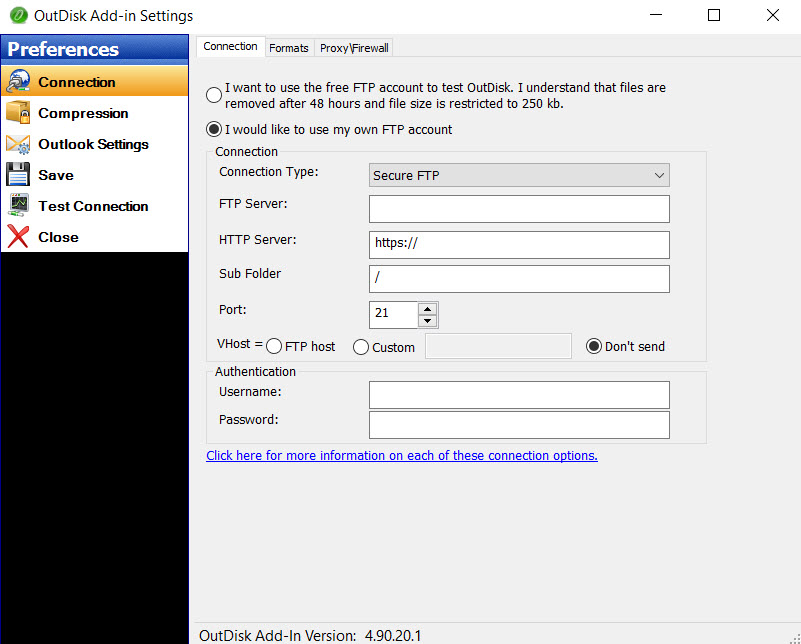
OutDisk SFTP Settings and connection properties.
The email default text inserted by OutDisk SFTP may be customized.
Configuring your SFTP server settings in OutDisk SFTP add-in.
Encryptomatic LLC has released an update to their MailDex 2020 email management and conversion software. Version 1.4.6 is an update that is recommended for all customers. It solves several user reported issues and includes the latest performance and user interface improvements.
This update is available to all customers with a current MailDex support and update contract. To update within MailDex, go to Help > Update Software.
The issues resolved include:
MDX228 & MDX119: The message count was incorrect for MBOX formatted emails
MDX346: A crash may occur when a certain column is maximized
MDX347: Index process sometimes became unresponsive with MBOX
MDX348: Improved single PDF conversion performance for MBOX files
MDX349: Now handles corrupted attachment names for MBOX files
MDX345: Advanced Search was relocated for improved ease of use
Location of Email Advanced Search
MailDex by Encryptomatic LLC is an advanced Windows software tool for indexing, searching and converting multiple email formats. Use MailDex to create a searchable index of millions of email messages. MailDex supports Outlook pst, ost, msg, as well as mht, mbox, and eml email files.
Encryptomatic OpenPGP add-in for Microsoft Outlook has been updated. The latest version is 2.6.5 and is now available for download.
This release resolves several user reported issues and is recommended for all users.
The numerous enhancements in this release include:
Improve message wording for unsigned messages.
Added an option to decrypt attachments only.
Improvements to text formatting.
Allow extending a key's validity.
Fixed an issue with opening signed inline messages.
Resolved issue where auto conversion from html body to plain text body adds extra spaces to the message text.
Improved decryption trigger for non encrypted emails.
Resolved an issue where selecting today's date as expiration date when creating key produces wrong expiration date (+>100 years).
Fixed problem where Add in can not open signed multipart message.
Resolved issue where Detail box after decryption does not open if something failed or if message is un-signed.
Resolved issue where key creation and expiration time are not UTC https://tools.ietf.org/html/rfc4880#section-3.5
Fixed an issue where signature verification may fail when it should be successful.
Encryptomatic OpenPGP is an add-in for Microsoft Outlook 2010, 2013, 2016, 2019/365 that brings OpenPGP email encryption to the Outlook toolbar. It is used by companies and individuals to send end-to-end public key encrypted email messages from Outlook,
Learn more about Encryptomatic OpenPGP at our website, and download the software. Encryptomatic OpenPGP is free for personal, journalism, activist and non-profit uses, and very affordable for business/government uses.
PstViewer Lite is the little brother of our PstViewer Pro email viewer. At Encryptomatic LLC, we haven't paid much attention to PstViewer Lite lately. It's one of those rock solid products that performs well and hasn't demanded much attention from our support or development staff. That is about to change, however.
We are presently working to update PstViewer Lite to the most advanced version of our MVCOM email rendering engine. This will keep PstViewer Lite performing well into the foreseeable future. The impending update of PstViewer Lite seems like a good reason for us to re-introduce this workhorse Windows software product.
PstViewer Lite was first released a decade ago to fill a market need for a budget priced, well supported Microsoft Outlook email viewer. You can associate PstViewer Lite with many different email file types, including .Msg, .Eml, .Mbox, .Pst, .Pst and even .MHT and .MHTML files.
Associations can be changed any time, but typically is set during the initial installation of PstViewer Lite.
Associate PstViewer Lite with different email file types.
PstViewer Lite is simple to use. Just locate the folder that holds the email file(s), and PstViewer Lite will read the individual mails into an organized list. To preview an email in the viewing pane, just click on it.
Click on an email to preview in the viewing pane.
To investigate the email message further, double click to open it in a full window.
An HTML email rendered in a full window.
PstViewer Lite's important functions are quickly assessible from the main menu, including Reply, Forward, Print, Search and PDF
PstViewer Lite main menu
Email Search
PstViewer Lite has advanced search capabilities. Use it to search a ost, pst or mbox file, as well as directories full of .msg and .eml emails. Clicking on the search icon brings up a quick text search option. A more advanced search option is available to allow you to search for emails by mixing criteria such as sender, setting start and end calendar date for the search, searching specific email fields such as subject, sender, recipient and more.
Email Advanced Search Function
Email to PDF
PstViewer Lite can convert an email message to a PDF document. This is the main difference between PstViewer Lite and Pro. Where PstViewer Pro can export thousands of emails to PDF, PstViewer Lite will export individual selected emails to PDF. The results are impressive.
To convert an email to PDF, first select an email from the PstViewer Lite email list. Next, click the PDF icon in the toolbar, and finally choose a place to save the PDF file.
Anyone purchasing the product today will receive the software update next month. If you have any questions, please post them here or call us! 1-651-815-4902 x2.
The latest update to MailDex 2019 email management and conversion system now includes the ability to visual email search searches. The MailDex team is happy to bring this advanced functionality to our customers, which has previously been the domain of expensive email discovery service providers. MailDex 2019 creates a searchable index of your email content. Indices are project based, and you can create as many email indexing projects as necessary. Projects can be created and disposed of according to your needs. Deleting a project does not delete the email content, just the email indices. MailDex 2019 is useful for archiving and discovering email content. At $129.99 per license, MailDex provides high email content management features at a competitive price point.
Searching Email
MailDex provides two search methods. With MailDex Simple Search, simply enter a single search term. MailDex will create a list of all emails in the index that contain that term. MailDex's Advanced Search allows you to create complex search results using regex terms. Advanced search lets you build and store searches that contain multiple terms, as well as excluding other terms. Advance search can search a specific date range.
MailDex 2019 Advanced Email Search.
Free Trial
This MailDex 2019 update is available to all MailDex users by updating through the MailDex software update system. A 15 day free trial of MailDex 2019 can be downloaded from the product home page at Encryptomatic.com/MailDex/Download
No credit card or personal information is required to run the MailDex free trial. The free trial may be converted into the full version by purchasing a license activation code. Software licenses for MailDex are perpetual. MailDex 2019 requires Windows 10, 2 GHZ processor, 2 GB disk space, and 4 GB RAM (more is better).
Encryptomatic MailDex email archiving system has been updated. The latest version 1.3.4 is now available for free trial on the MailDex website. Customers with a valid MailDex maintenance and support service subscription can update from within the software Help tab.
MailDex Checking for Updates
A major improvement has been made to the advanced email search. Users can now include AND/OR/NOT criteria and design "Sets" of search criteria. Searches may be saved and reused at a later time.
Advanced Email Search in MailDex.
If you have been working with our support team on an issue, the following tracked issues have been resolved in this release.
Features:
MDX-217 AND/OR Searches improvements
Fixes:
MDX-194 Regex "And" search
MDX-224 Update folders and icons names to MailDex 2019
MDX-227 RegEx search improvement
MDX-231 MDX 1.3.1: Add group may cause crash in some instances
MDX-232 MDX 1.3.1: Clicking on search icon may cause issue in some instances
MDX-233 MDX 1.3.1: Save-as improvement
MDX-234 MDX 1.3.1: Control may appear out of frame
MDX-236 Save throws unhandled exception in some instances
MDX-239 Require activation over TLS only.
MDX-242 Update links for Connect with us