18 February 2015

We can't stop making MessageExport better

When customers call us with great ideas, some times they're so good that we stop and get them into the software right away. While we just released version 3.5 of MessageExport a few weeks ago, we're happy to offer you an updated version 3.5.8 today.

A client called us and explained how we could make his job easier by expanding the functionality of MessageExport's file explorer. The explorer integrates to Outlook. It has been a convenient way for MessageExport users to convert individual e-Mails to PDF, or any of the other supported formats, simply by dragging the email from Outlook and dropping it onto the desired folder in the explorer.  MessageExport automatical converts the file to the selected format (formats are called "Export Profiles" and are selectable in MessageExport's drop down list).

What our customer wanted was a quick and easy way to use MessageExport's file explorer to preview files, and to select them for attaching to an e-Mail. With MessageExport's new explorer functionality, you can now accomplish a variety of additional tasks, such as exporting an email to PDF and then easily attaching it to an email message.

This short video demonstrates MessageExport's new file explorer integration with MS Outlook


Install and uninstall support is available from the Encryptomatic LLC support team.  Download the free 15 day trial of MessageExport and see if it can save you time.


20 January 2015

MessageExport 3.5 Released

MessageExport has been updated to version 3.5.  This version of MessageExport includes the new capablity to export embedded email attachments.  Now if you export an email message to PDF that has a .msg or .eml email attachment, MessageExport will process those embedded emails in a logical manner.

This release of MessageExport also includes the ability to select multiple folders for each export profile. 

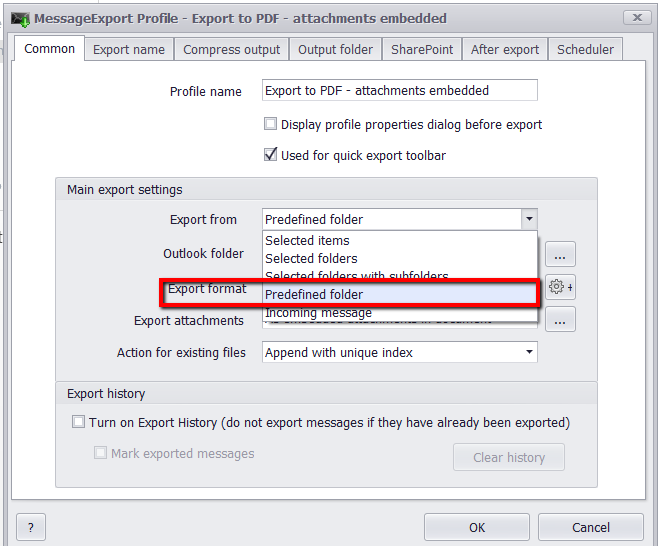
Existing users will understand that an export profile is a set of instructions that you can quickly execute against a set of email messages.  Using Export Format: Predefined Folders, you can now run an existing export profile against a group of selected folders, rather than only one specific folder. This greatly enhances the usefulness of export profiels.

To set this feature, edit an Export Profile, then go to the Common tab. Click "Export From" and choose "Predefined Folder."

Export Email From Predefined Outlook Folders

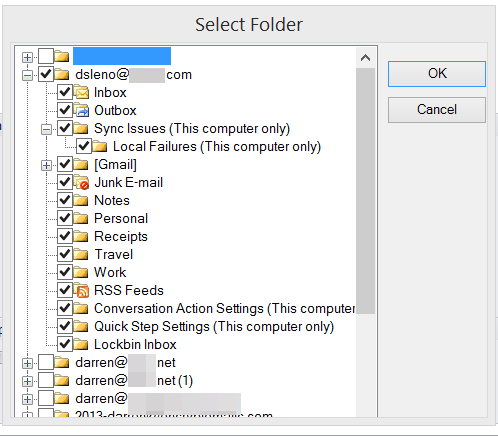
You can now indicate the folders that you want this profile to run against by placing a check in the box.
Select Outlook Folders.

Learn more about MessageExport and download a free trial from https://www.encryptomatic.com/MessageExport

31 October 2014

Encryptomatic's Free Online .MSG and .EML File Viewer

Since 2012, Encryptomatic LLC has operated MessageViewer Online, a free service that opens email messages online in your web browser. Just upload a .msg or .eml file, and voila! There it is!

We decided to build MessageViewer Online after realizing that many people were being enticed into downloading supposed "free" email viewers and installing them on their computers. Some of these tools were invasive to people's privacy, would try to upsell them into more expensive products, and just didn't work very well.

We thought that wasn't right. People who have just a few .msg or .eml emails to open shouldn't have to put themselves at risk by installing one of these "free" email tools. So we built MessageViewer Online. It was a good learning exercise for our staff, and we're very pleased that it has been well used now for two years.

The biggest question we get about the service is, "What do you do with the emails I upload to MessageViewer Online?"  People are rightly concerned and skeptical that their email addresses might be harvested and sold off in a spam list.  We accept that skepticism, and our omisssion to include some kind of specific privacy statement on the page hasn't helped, even though our standard policy applies to this service.

Emails sent to MessageViewer Online are rendered to the uploader's web browser as a html web page. The email message and file attachments are temporarily cached for this purpose. About every ten or fifteen minutes, the entire cache is erased by a file deletion script.

We haven't yet found a business model for MessageViewer Online. We've thought about putting ads on it.  Harvesting email addresses for spamming is a business model we rejected at the outset (we never spam). Charging for use? Nah.

The best idea we've had so far is to just provide a link to one of our Windows email viewing software programs.  If you need to go beyond MessageViewer Online for managing email content, please consider trying one of our email viewers.

We're glad so many people find MessageViewer Online useful. We welcome your ideas and suggestions, not only for how we can improve it, but how we might build a sustainable business model around it.


20 October 2014

PstViewer Pro maintenance release available.


PstViewer Pro email viewer for Microsoft Windows has been updated. 

For more information on PstViewer Pro, please visit https://www.encryptomatic.com/pstviewer/

Changelog:
========================================================================================
Version 6.0.357.0
========================================================================================

- 0003818: [Add] Date format “yyyy-MM-dd” 
- 0004336: [Add] Release license when PVP is uninstalled
- 0003892: [Add] Ability to print every message starting from new page 
- 0004329: [Fix] Crash on attempt to delete an email from pst file
- 0004005: [Fix] Error message when checking for updates 
- 0004175: [Fix] Error when exporting specific EML message 
- 0004212: [Fix] Registration from command line with PIDKEY parameter 
- 0004261: [Fix] Printing to PDF changes signature and font color 
- 0003819: [Fix] Date format is displayed as 12-hours 
- 0003542: [Fix] Folders like "Libraries" and "Control Panel" don't get opened in Explorer 
- 0003839: [Fix] Search for .MSG and .EML files 
- 0004108: [Fix] Search and Filter functions return different results on the same query 
- 0003946: [Fix] 24-hours format for Sent/Received time 

09 September 2014

MessageExport maintenance release, 2.3.6.0, now available.

Hello All,

We have updated MessageExport 2.3.6.0. This is a maintenance release. It's optional, but we recommend it for all customers because of some fixes that were made to PDF search capabilities.


MessageExport Change Log:
================================================================================================
Version - 2.3.6
================================================================================================

- 0003834: [Add] "Browse for folder" dialog improvded
- 0003879: [Fix] Resolved an odd issue related to the PDF component used in MessageExport, wherein the word "Attachment" may not have been searchable in resulting PDF files. 
- 0003168: [Fix] Resolved another odd issue involving small font after exporting some "RE:" messages to PDF
- 0003413: [Fix] Improved exporting docx attachments, and resolved an issue relating to a specific docx attachment that a customer sent us. 
- 0003580: [Fix] Improved "Const '.'" in naming schema
- 0003431: [Fix] Header information may have been exported incorrectly. We fixed it.
- 0004039: [Fix] Some Windows XP users were seeing an Error message involving a .cab file. This is now resolved. 

MessageExport is an add-in that expands Outlook's ability to export email messages to PDF, MSG and many other formats.  People use MessageExport in creative ways to automate their work with email.

04 June 2014

PstViewer Pro email viewer is updated

PstViewer Pro has been updated! Version 6.0.0.294 is now available. It improves a number of functions around reply/forward/reply all operations, especially with .eml and Windows Exchange. 

You can download the update through your PstViewer Pro software.  A free 15 day trial can be downloaded from https://www.encryptomatic.com/pstviewer/download.html

Outlook email viewer, PStViewer Pro, is used for seaching emails in .pst, .msg, and .ost and .eml files.
Outlook email viewer, PstViewer Pro.
PstViewer Pro is an advanced email viewing tool for searching, printing, converting, replying and forwarding email content. It works with Outlook .pst, .ost, .msg and .eml email files.  Directories of .msg and .eml files can be displayed in an a mail list.  Double click on a message to obtain a full screen view.

PstViewer Pro can also bulk convert email content and most common file attachments to .pdf and other useful formats.


14 April 2014

PstViewer Pro maintenance update is available

Our software development team has released an update for the PstViewer Pro email viewer.

PstViewer Pro 6.0.0.247 is now available for download. This is a recommended maintenance release that addresses some issues in the search algorithm for .msg and eml email files.

This build addresses the following issues.


  • Search fixes for .MSG and .EML files
  • Error in Outlook when sending an email
  • Problems with Unicode symbols in "Reply" and "Reply all" methods
  • Outlook freezes after "Reply" button is pressed in the email viewer window
  • Correctly open second email window
  • Long attachments names in EML file are cut and displayed without any extension
  • Launch version with correct bit capacity when file is opened from Windows explorer
  • Change trial key type to "offline"
PstViewer Pro is the leading commercial email viewer viewer for .pst, .ost, .eml, and .msg email files.  For more information visit the Pst Viewer Pro home page and download a free trial. 

For assistance installing or updating PstViewer Pro, contact support.