14 February 2021

Announcing Our Relocation


As part of our domestication from Minnesota to North Dakota, we have a relocated our corporate headquarters. Same great people, just a different physical address and phone number.

Encryptomatic LLC
1630 1st Ave. North
Suite B-8
Fargo, ND 58102

Our general email box is: SupportLine@Encryptomatic.com

Our new telephone number is: +1-(701) 566-6731

Our EIN remains the same.

09 February 2021

Encryptomatic® OpenPGP 2.7.7 Email Encryption Add-in for Microsoft Outlook is now available.


Today we released Encryptomatic® OpenPGP  (EOPGP) version 2.7.7, our OpenPGP  encryption software for Microsoft Windows 10 desktop and Microsoft Office Outlook.

Due to the nature and number of enhancements in this release, it is recommended for all users. Please update your software.

Encryptomatic OpenPGP is an add-in for Microsoft Office Outlook that integrates with the Outlook menu system, and allows you to determine default settings as to how it interacts with your mail workflow.   

OpenPGP for MS Windows Desktop

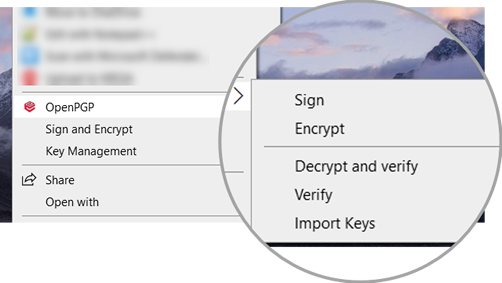
Encryptomatic OpenPGP also works with the Microsoft Windows 10 desktop through the right-click context menu.  

Screen image of Encryptomatic OpenPGP Windows context menu.


Encryptomatic OpenPGP is professionally developed and supported.  It remains free for most users, including activists, independent professional journalists, individuals and non-profit organizations. For business users, we ask that if our work is useful and valuable to you, please help us to continue focusing a developer on this product by purchasing an affordable annual license. 

This update includes some new features:

[EPGP-294] - Have the option to associate extension .pgp to open files with double click

[EPGP-295] - Offer the option to compress multiple files/folders then encrypt

[EPGP-298] - Ability to encrypt text from a notepad and paste to the body of an email

Enhancements in this update include:

[EPGP-302] - Compatibility with Hubspot CRM tracking.

[EPGP-310] - improved file type association with Outlook attachments containing the .pgp file type.

For this release, we took extra time to focus on more than 20 user reported improvement suggestions and bugs. Thank you for your reports and collaboration. We take all reports very seriously, and we remain focused on our goal of making EOPGP the most stable, secure, easiest-to-use OpenPGP system for Windows and Outlook.  

Resolved tracked issues include:

[EPGP-303] - Fails to change expiration date if one has not previously been specified.

[EPGP-306] - Fixed an error when sending with atstachments (not signed)

[EPGP-308] - Newly configured / deleted account not visible in key generation dialog

[EPGP-309] - Incomplete deciphering of Encrypted/Signed Messages with certain circumstances.

[EPGP-311] - Improved copatibility with forward/reply/reply when multiple Outlook accounts have been configured.

[EPGP-312] - Providing the wrong passphrase while changing expiration date may crash Outlook

[EPGP-313] - EOPGP might failto change expiration date when there are multiple user ids on the key

[EPGP-314] - Managing user ids for a key, from Windows app may throw an unhandled exception

[EPGP-315] - Key details form can now be resized to hide buttons.

[EPGP-316] - Key management table doesn't preserve  the order of items and selected item after actions that refresh the list

[EPGP-317] - "Send to email" context menu item may cause an unhandled exception (Windows app only)

[EPGP-318] - Revoke and Create revocation certificate actions may cause error (Winapp only)

[EPGP-319] - Deleting a key may cause an unhandled error (winapp yes/ addin maybe)

[EPGP-320] - Generated revocation cert had a double .asc extension

[EPGP-321] - Decryption failed attempt leaves .DEC file behind

[EPGP-322] - EOPGP WinApp icon duplicates when opening multiple files.

[EPGP-324] - Error shown when clicking on NO for email address without a key

[EPGP-296] - Icon missing when Outlook is resized to small view state

[EPGP-297] - EOPGP unable to retrieve keys from FlowCrypt server is resolved.

Support for Encryptomatic OpenPGP is available through our ticket tracking system, or by email.  


05 November 2020

MailDex 2021 Email Indexing Software Now Available.


Hi everyone,

Darren here. I'm very happy to tell you that your MailDex email indexing software has been updated! Thanks Antonio and Velja for their care and diligence to MailDex quality.

You can now upgrade to MailDex 2021. This release includes some big new features, such as indexing email file attachments, improved language translations, and more.

Read all about it over at the product blog MailDex.net

28 September 2020

Encryptomatic Announces the Availability of OpenPGP for Windows Desktop and Outlook.


We appreciate all of the support we have received from users of Encryptomatic OpenPGP add-in for Microsoft Outlook. Today we are very pleased to announce that we have extended its encryption capabilities to include folders and files on the Windows desktop.  

In the latest release, Encryptomatic OpenPGP now includes Windows desktop functionality and integration with the Windows right click context menu.

Screen shot showing OpenPGP integrated with Windows desktop right click context menu. Capabilities incude Sign and Encrypt, and Key Management..

By downloading and running the signed installer package, Encryptomatic OpenPGP will integrate with Windows desktop and Microsoft Outlook (if available), then launch a wizard that will guide new users through the process of creating a key pair.


For information on downloading and installing Encryptomatic OpenPGP, visit the product homepage.


27 April 2020

MessageViewer Lite Email Viewer is Updated

We have updated MessageViewer Lite to Version - 5.0.476.0

This maintenance release is recommended for all customers.  We have implemented the the latest version of MVCOM email rendering engine, as well as updating software controls. Some minor issues have been resolved.  The result is a more stable, up-to-date product capable of rendering even more complex emails.

This update is available to all users of MessageViewer Lite. 


Screen image of MessageViewer Lite software for Windows. View .eml .msg email files. Simple email viewer.
MessageViewer Lite, the Simple Email Viewer for Windows.

You can download the update or a 15 day free trial from the official MessageViewer Lite software product home page.

MessageViewer Lite is a simple email viewer for Outlook .msg and Thunderbird .eml email fiels.  Access email file attachments and print email messages. MessageViewer Lite is often distributed with other software for simple email viewing.

MessageViewer Lite is developed and supported by Encryptomatic LLC, the publisher of this website. To run MessageViewer Lite, you will need a PC with Microsoft Windows 10/8/7, 2 GB ram, and 100 mb of disk space.  Software install and uninstall assistance is available free.  End user license.

26 March 2020

Working at Home?

We won't spend too much time here recapping current events.  You know what's going on.  And you're probably working from home right now as you read this.

Encryptomatic LLC has been a digital company from the moment of its founding in 2005.  100% of our employees and contractors are able to work remotely. Its a way of working to which we are fully accustomed.  It has been a bit of a surprise to us just how much of the world is finally getting around to working online.

Since last week, things have slowed a bit for us, so if you have any questions about working online, or about how we work, or the tools we use, or whatever... feel free to connect with us.  We enjoy hearing from people like you, and are always glad to help in any way we  can. 

We are a small company. We are real people.  If we can do anything for you right now, we will be glad to try to help.


07 February 2020

MailDex 2020 is Updated


We have updated MailDex 2020 (v1.5) email manager and exporter.

This update resolves several issues discovered by our QA team.  It also includes a new feature, export email to XML.


Screen image showing location of email to xml export in MailDex.
Export Email to XML with MailDex
A screen shot of a xml file containing email content.
Email that has been converted to XML


Export to CSV has also been improved. Additional email data fields are now included during CSV export operations.

The full list of changes to MailDex 2020 include:
Feature: MDX-222    XML Export format added for data collection, CSV fields expanded


MDX-220    Margins not centered on output PDF
MDX-366    Export to CSV fails silently when overwriting file in use
MDX-367    CSV file may be malformed if there are multiple file attachments in a .msg file
MDX-368    Some email file attachment names may not be not exported to CSV
MDX-372    File may fail to convert during Single PDF export operation.

How to update MailDex

You can update MailDex from within the software by going to Help > Check for Updates.

Screen shot showing location of MailDex "Check for Updates".
Check for Updates


Alternatively, you can download the free trial and install it on your computer. The installer will detect if you have a licensed copy of MailDex, and will install the updates.


Screen image of MailDex, "Completing the MailDex 2020 Setup Wizard"e
Update MailDex 2020