04 March 2013

MVCOM Email Parsing Component: What Content/Meta-data Does It Track

MVCOM is a COM component that software developers use to manage email content stored in Outlook .pst, .msg, or .eml files. It's the same technology used in Encryptomatic's email viewers, like Pst Viewer Pro.

Today a customer asked: 
When the component extracts a pst file, does it write to a temporary table in memory?

During the extract, what content/metadata of each file does it track? 


MVCOM component keeps temporary data in memory.
Such temporary data includes:
  • physical structure binary tree, also known as Node Database Layer.
  • logical structure binary tree, also known as Lists, Tables, and Properties (LTP) Layer
  • object structure, such as Messages/Folders objects, etc
  • Temporary data uses lazy initialization tactic of creation.
The temporary data table is empty after opening a PST/OST file, then it is being filled, step by step depending of course which data an application wants to extract.
For each PST/OST file MVCOM tracks header information, like:
  • Format version
  • ANSI/Unicode type
  • Encryption method
  • Store object location
  • etc
This information is low level and not available to end users.

For each message inside PST/OST the full set of content/metadata can be extracted by user.
The most common content can be extracted directly, for example
  • Subject
  • Sent/Receive datetime
  • From,
  • To/CC/BCC lists
  • message Body
  • Email file attachments and more.

MVCOM can read all native MAPI properties, so you can extract metadata, such as
  • Transport Headers,
  • Priority,
  • Labels,
  • ThreadIndex and more
  • (for additional information please refer MVCOM.MailItem.Properties method)

18 February 2013

PDF Postman for Outlook Update Available

The PDF Postman email encryption app for Microsoft Outlook has been updated. Version 1.3.2.2678 resolves a few small issues that improve stability with Outlook 2013, and a local encoding issue. Download the update from the PDF Postman product home page at https://www.encryptomatic.com/pdfpostman/

PDF Postman integrates tightly with Microsoft Outlook to make it easy to send and receive password encrypted PDF files using strong AES-256 bit encryption.  With PDF Postman, you can protect sensitive messages and even embed files inside the PDF which can be extracted by the recipient.

PDF Postman helps simplify Outlook email encryption, particularly for recipients. All that is required to receive an encrypted PDF file is one of the free viewers, like Adobe Reader or PDF X-Change viewer.  The recipient clicks the PDF file; the viewer recognizes it as an encrypted pdf file and prompts for the password. If the password is correct, the message and files inside the PDF are made available to the recipient. 

PDF viewers are available for virtually every platform, from Windows, Mac, iOS, Android, Linux and Solaris.  With PDF Postman, no expensive or complex certificates are required.  Download a 15 free trial of PDF Postman.

08 February 2013

Pst Viewer Pro 4.8 Update Available

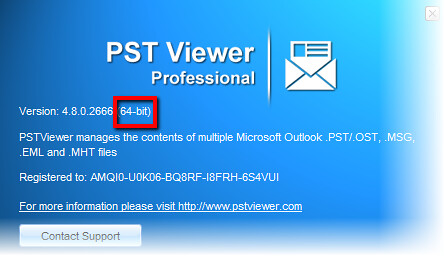
We have released an update to Pst Viewer Pro. We recommend this update to all customers. With version 4.8, Pst Viewer Pro is now a native 64-bit application when installed on a 64-bit Windows operating system, allowing it to access more RAM memory and improving speed.

Download the update here.

Pst Viewer Pro is now a 64-bit app for searching and exporting Outlook email messages.


Enhancements
- 64 bit PST Viewer Pro version installs automatically
- Easy selection for all messages in the list, "Select all" context menu item has been added
- "Connect with us" menu item
- New association icons
- Improved EML decoding
- Improved message enumeration indicator in the status bar

Issues Resolved:
- Fixed incorrect shortcut icons in the folder tree
- Removed VML artifacts from HTML message body (MSG, PST, OST files)
- Resolved subject cutting in Japanese for some EML files
- Fixed very small font size in PDF export
- Fix for error 'System.IO.FileNotFoundException: Could not find file DockLayouts.xml'
- Fix for error 'System.OutOfMemoryException' when reading messages
- MHT file icon is missing for 64-bit system
- Improved export to MBOX format, removed odd new line symbols
- Corrected exporting MSG file with MSG attachment to EML format with "noname" file attachments.

03 January 2013

MessageLock 2.0 released with Lockbin integration

MessageLock version 2.0 has been released.  MessageLock is an email encryption add-in for Microsoft Outlook 2016/2013/2010/2007, both 64 and 32-bit versions of Outlook. MessageLock makes it easy to send secure messages using a password and a variety of tools, including zip-compatible AES-256 encryption, self-extracting/self-decrypting packages, and more.  This latest version of MessageLock includes an integration to the Lockbin.com webservice.

Lockbin is a secure platform for exchanging documents and email messages that uses a FIPS-140 cryptolibrary for HIPAA compliance. The integration with MessageLock allows users to use their free or premium Lockbin account. Emails can be downloaded directly from the Lockbin server to Outlook.  The transparent use of Public Key encryption makes it easy easy for a premium Lockbin user to send and receive secure messages to or from any other Lockbin user, as no password exchange is required.

For more information or to download a free trial of MessageLock, click here.

Image shows how to setup your Lockbin.com account in MessageLock
Setup Lockbin Account in MessageLock

Image shows how to download your Lockbin email to Outlook
Lockbin emails can be downloaded directly to Outlook

Image shows the MessageLock toolbar installed in Outlook 2010.
Encrypt Outlook emails with MessageLock
Image shows the MessageLock Encryption Passwords window.
MessageLock passwords

02 January 2013

Pst Viewer Lite version 4.7.3.2616, Update Available

Pst Viewer Lite has been updated to improve eml file rendering.   Version 4.7.3.2616 is now available to customers.

Pst Viewer Lite is an affordable yet full featured email reader for Outlook .pst, .ost, .msg and .eml files. You can use Pst Viewer Lite to search email messages, and save them to different formats including PDF. The main difference between Pro and Lite is the ability of Pro to bulk export and convert email messages.  Lite has pdf and export abilities for individual message files.

Learn more about Pst Viewer Lite.

31 December 2012

Thanks for a great year!

Today is December 31, the last day of 2012. We want to take a moment to express our sincere thanks to our customers for making this a great year for Encryptomatic LLC.  We hope our products will help you be more productive and secure in 2013. We look forward to delighting you with excellent customer service and useful updates, and maybe even a new product or two.

We wish you great happiness, continued health and success in 2013.

Sincerely,

Darren the crew at Encryptomatic LLC

PS - Here's a video that always puts a smile on our faces.  We hope you enjoy it.


14 December 2012

MessageViewer Online published as a Chrome app


We've been having a lot of fun with our MessageViewer Online web app.  It's free, and we invite anyone to use it to view their emails and download file attachments. It supports online viewing of Outlook .msg, .eml and winmail.dat files. Hundreds of people use MessageViewer Online every day. We've enjoyed watching it grow and providing this free service.

Today we published MessageViewer Online as a Chrome app. That's us on the right...
MessageViewer Online Email Viewer now published as a Chrome app.
If you are a user of the Chrome browser or a Chromebook computer, you can install the MessageViewer Online app for Chrome.

MessageViewer Online is a demonstration of the rendering capabilities of our MVCOM .NET email component.   We hope you find this app useful. Feel free to contact us through the usual channels or comment here about how we can make MessageViewer Online a better tool for you.

If you are a Windows user, you can still use MessageViewer Online. If you would prefer to have it as a Windows app, look at our Outlook .Pst viewer software.